

Looking for a Shorter Overview?
AI Summary
Key Moments
Widget vs. Copy-Paste Distinction
Widgets displaying live reviews don't need permission; copying text or screenshots does and carries copyright risk.Platform-Specific Rules
Each review platform has unique content policies and terms of service regarding review display methods.FTC Consumer Review Rule Compliance
Incentivized reviews must be disclosed, and buying fake reviews or misrepresenting testimonials is prohibited.GDPR Requirements for EU Reviews
Displaying EU customer reviews requires a legal basis to process personal data, often needing consent for republishing.Before you paste that glowing five-star review onto your site or embed your Google rating widget, pause. Displaying customer reviews isn’t just a design decision — it’s a legal one. The answer to “what permission do I need to display a customer review on my website” depends entirely on where the review comes from, how you’re displaying it, and whether any money or incentive changed hands.
Key Takeaways
- Public reviews on Google, Yelp, and Facebook can generally be displayed via widget without additional permission
- Copy-pasting a review’s text onto your site requires permission from the reviewer
- Any incentivized review needs FTC disclosure, not just permission
- Third-party review platforms (Trustpilot, G2, Capterra) each have their own content policies
- GDPR applies if you’re displaying reviews from EU customers
The Short Answer
For most business websites, using a widget that pulls live data from a public review platform (like Google or Facebook) doesn’t require asking the customer for permission — the review is already public, and the widget just displays it. But if you’re reproducing the actual text of a review on your site, or using a screenshot, you generally need explicit consent from the reviewer. The rules change further if the review was incentivized, if it comes from a verified platform, or if your customers are based in Europe.
Widget vs. Copy-Paste: The Core Distinction
This is the distinction most articles skip, and it’s the one that causes the most confusion.


| Widget (Live Embed) | Copy-Paste (Static Text) | |
|---|---|---|
| What it is | An iframe or script that pulls and displays reviews from a platform’s public API | Manually copying a review’s text, star rating, or screenshot into your own page |
| Permission needed from customer? | Generally no — the review is already public | Yes — you are reproducing their words on your site |
| Platform ToS risk | Low — most platforms allow widget embedding | Higher — some platforms prohibit reproduction of review content |
| Copyright risk | Low — you’re not copying text, just displaying via sanctioned method | Moderate to high — the text you copy is the reviewer’s intellectual property |
| Example | Google Reviews widget on your homepage | Quote: “Best service I’ve ever experienced!” on your landing page |
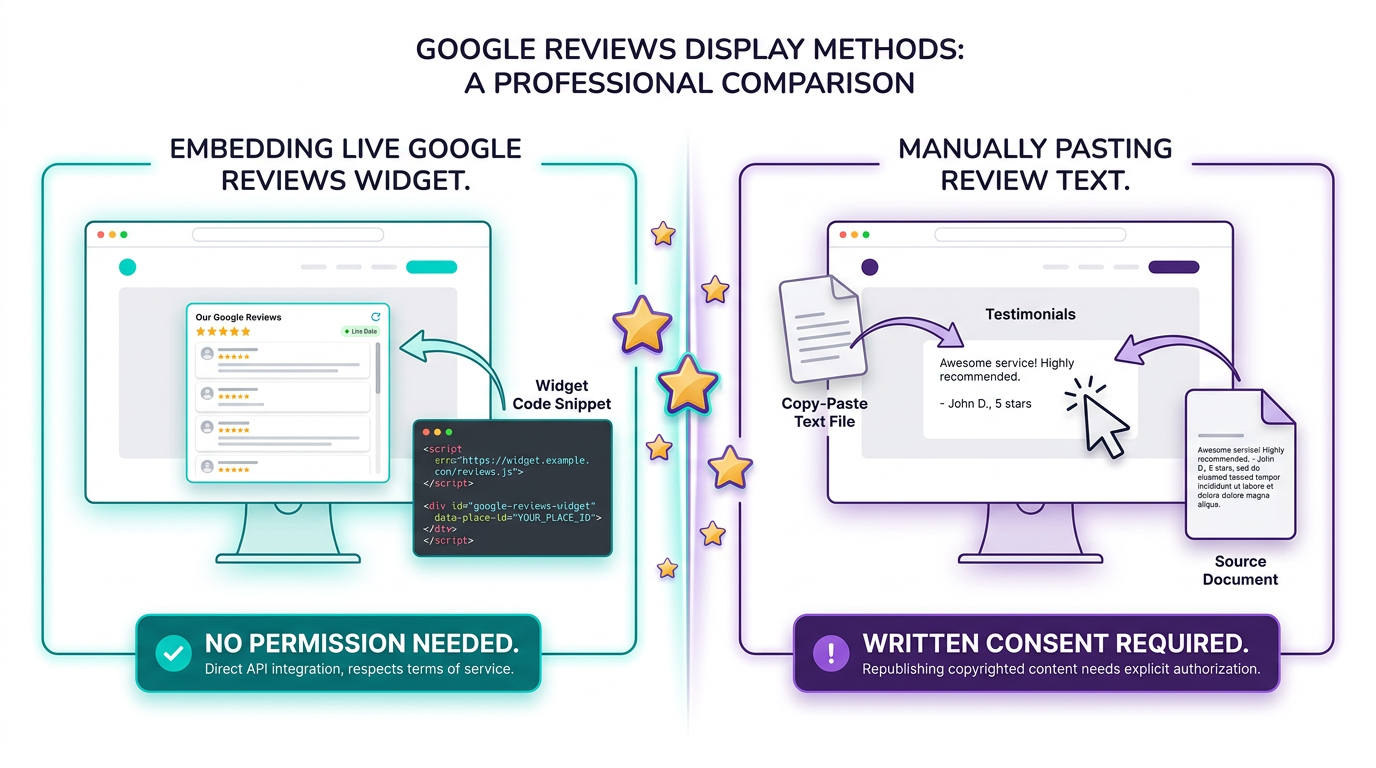
The widget approach is why tools like Bragly exist — they let you display reviews from multiple platforms without needing to ask each customer for written permission. You connect the platform, the widget handles the rest.
Platform-by-Platform Rules
Google Reviews
Google’s Content terms allow businesses to display Google reviews on other websites via Google’s officially sanctioned widgets. What you cannot do is scrape Google review text and reproduce it on your site without permission. The star rating and basic review metadata (reviewer name, date, rating) from a public review can generally be displayed — but the full text, if you’re pulling it manually, requires care.
Using a widget means the review is displayed within Google’s own rendering environment, and Google handles the permission question on your behalf.
Yelp
Yelp’s Terms of Service explicitly prohibit businesses from copying or scraping review content. Yelp also provides an official widget for businesses that want to display their reviews. If you see your business on Yelp and want to show the rating on your site, use Yelp’s widget. Manually embedding review text — even a single sentence — is a terms violation.
Facebook Reviews
Facebook’s platform policy generally prohibits extracting and storing review data outside of Facebook. However, Facebook does offer a Page plugin for displaying your Page’s reviews on an external website. If you’re manually pulling text from Facebook reviews to paste onto your site, that’s a policy violation — use the widget instead.
Trustpilot, G2, and Capterra
These third-party review platforms have their own content usage policies that are generally favorable to businesses — but not unlimited. Most offer free widget programs that let you embed reviews on your site. Here’s the key thing they have in common: you cannot scrape their content. Any reproduction of individual review text beyond what their widget allows requires a direct relationship with the platform or explicit reviewer consent.
For businesses managing reviews across multiple platforms, Bragly’s Trustpilot integration and its multi-platform review management means you can display reviews from all of these sources in one place — without worrying about each platform’s specific widget policy.
The FTC’s Consumer Review Rule (October 2024)
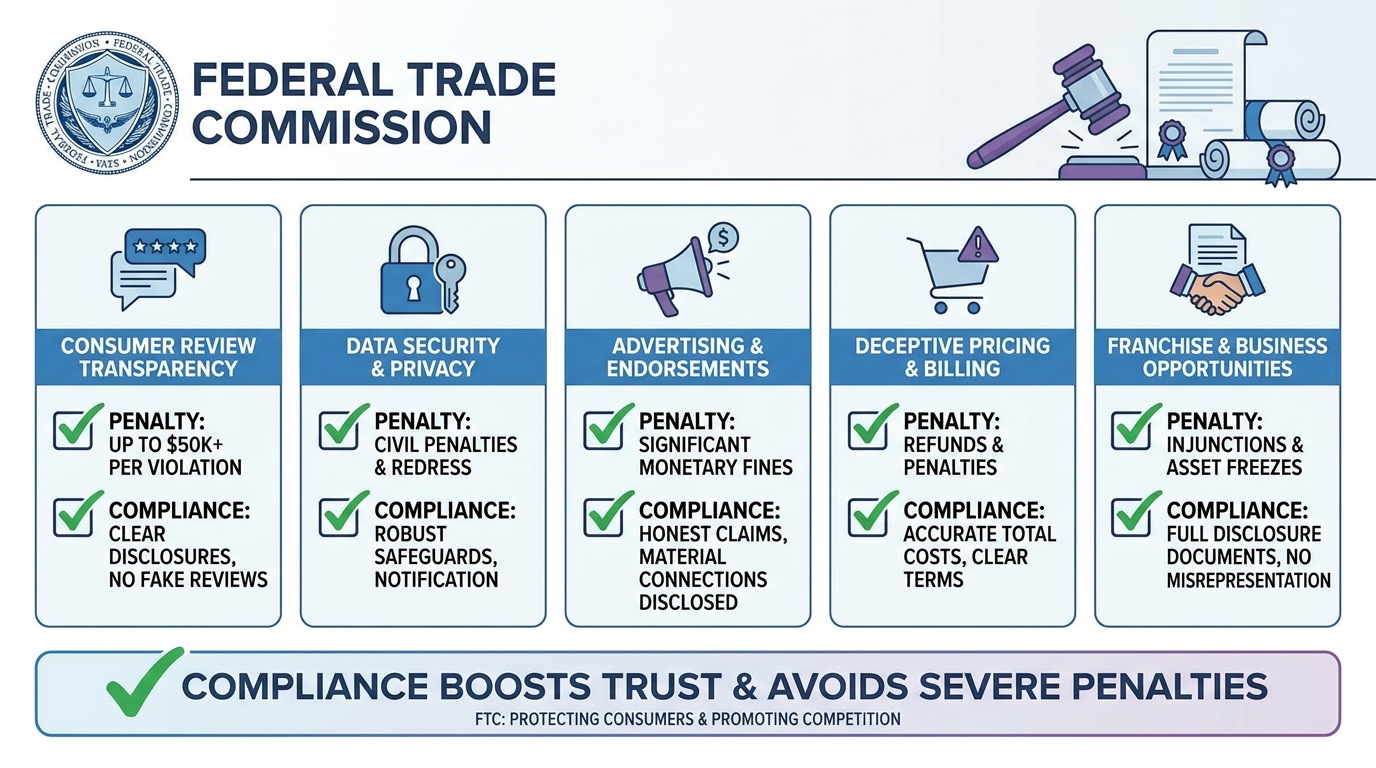
In October 2024, the FTC finalized a rule that fundamentally changed what businesses can and cannot do with customer reviews. This isn’t a “nice to know” — it’s a compliance requirement that carries real penalties.
What the Rule Prohibits
- Buying fake reviews — businesses cannot purchase reviews, positive ratings, or testimonials
- Threatening customers for negative reviews — using threats (legal or otherwise) to suppress negative reviews is illegal
- Misrepresenting testimonials — claiming a review is from a real customer when it isn’t
- Incentivized reviews without disclosure — if you gave someone a discount, free product, or payment in exchange for a review, you must disclose it clearly
What the Rule Does NOT Prohibit
- Asking happy customers to leave reviews
- Using review widgets that display public reviews
- Responding to negative reviews publicly or privately
- Soliciting reviews through follow-up emails or SMS
- Displaying reviews you’ve collected through a legitimate platform like Google or Trustpilot
The FTC’s position is clear: as long as the reviews are genuine, from real customers, and any incentive is disclosed, you’re on solid ground. The widget approach sidesteps most of these concerns because the reviews exist independently on the platform.
Copyright: Why Permission Is Really About Source
Here’s the part most people get wrong: the reason you need permission to display certain review content has very little to do with getting “consent” in the human sense — it’s a copyright issue. When a customer writes a review, they own the copyright to what they wrote. By posting it on a public platform, they’ve granted that platform a license, but that license doesn’t automatically extend to you.
This is why:
- A widget that displays a live feed doesn’t reproduce the text — it relies on the platform’s own license
- Copying and pasting a review onto your site does reproduce the text, which requires the reviewer’s permission
- A screenshot of a review involves reproducing an image that includes copyrighted text — same issue
- If the review platform’s terms allow embedding via widget, you’re protected; if you’re scraping, you’re not
The practical takeaway: use widgets wherever possible, and when you want to feature specific review text prominently, ask the reviewer directly. Most happy customers are flattered to be featured — a quick email asking for permission takes seconds and gives you written documentation.
FTC Endorsement Guides: When Disclosure Goes Beyond Reviews
The FTC’s Endorsement Guides apply not just to reviews but to any testimonial or endorsement. If you’re displaying a customer’s review in exchange for something — a discount, free product, early access, even a shoutout in your newsletter — you need to disclose that relationship clearly and conspicuously.
“Clearly and conspicuously” means:
- Not buried in fine print
- Visible before or at the point of the endorsement
- Written in plain language an average reader would understand
A simple “#ad” or “Review provided in exchange for a discount” in the caption or adjacent text is enough. The FTC has been increasingly active in enforcing this — particularly for influencer-style posts and video testimonials.
GDPR: What Changes for European Customers
If your customers are in the EU, or if you’re displaying reviews that belong to EU residents, GDPR adds another layer. The core issue: a review often contains personal data — the reviewer’s name, sometimes a photo, their opinions, and potentially other identifying information.
Under GDPR, you need a legal basis to process and display that personal data. The relevant bases for displaying customer reviews are:
- Legitimate interest — for reviews that are already publicly posted on a platform, legitimate interest may apply (this is context-dependent)
- Consent — for EU residents whose reviews you want to prominently feature or republish outside the original platform
A practical note: if you’re using a widget from a platform that already has GDPR-compliant data handling (Google, Trustpilot, and others all do), the widget itself is generally compliant because the platform handles the data. The risk area is copying review text and displaying it on your site — that moves the data to your servers, changing the compliance equation.
If your business has significant EU exposure, it’s worth having a privacy policy that specifically addresses how you use customer reviews and testimonials.
Before You Display Any Review: Your 6-Point Checklist
Run through these six questions before putting any review on your website:
- Is this review from a real, verifiable customer? (FTC requirement)
- Am I displaying it via the platform’s official widget or am I copying the text? (Widget = lower risk)
- Was this review written in exchange for payment, a discount, or any incentive? If yes, is disclosure included?
- Does the original platform’s terms of service allow external display via widget or API?
- Is the reviewer an EU resident? If yes, is there a GDPR-compliant basis for displaying their data?
- Does my privacy policy mention the use of customer reviews and testimonials?
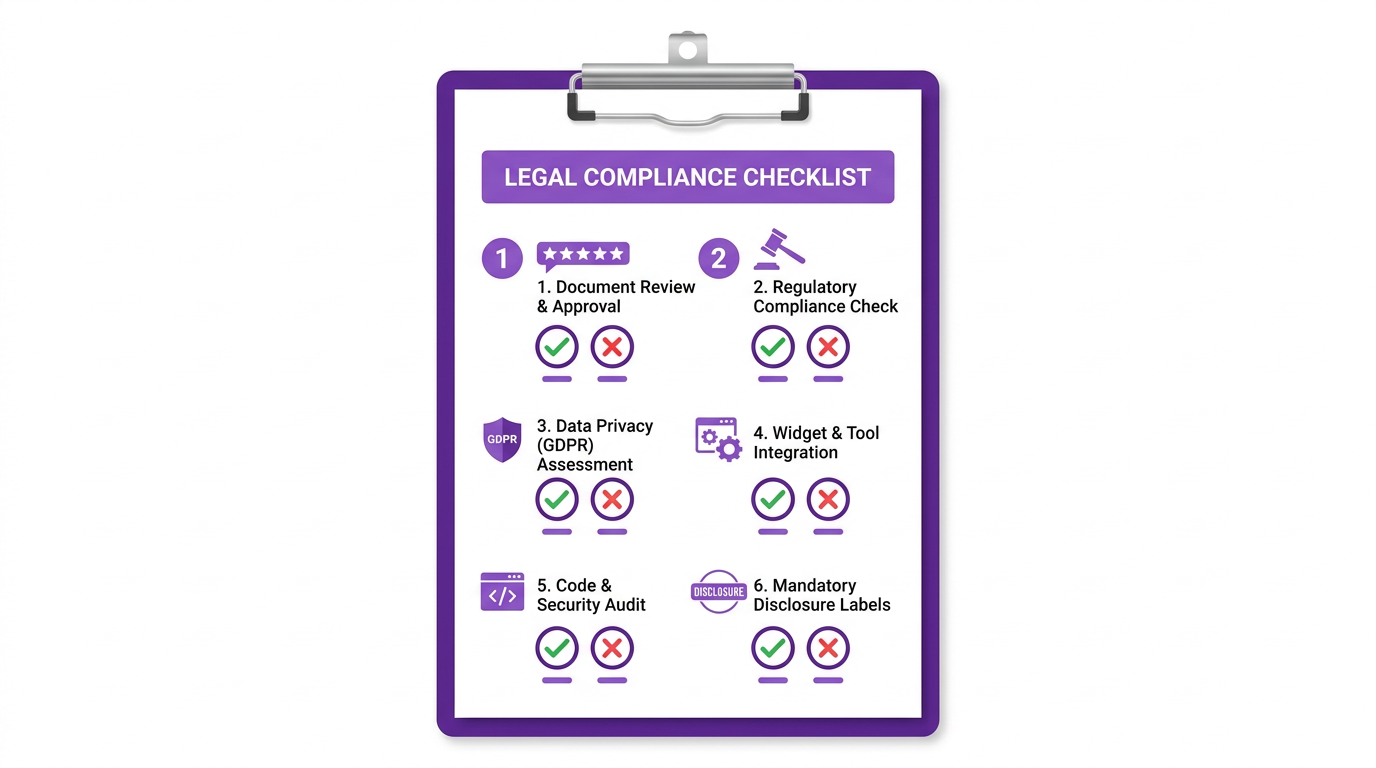
If you’re answering “widget” to question 2 and “no” to questions 3 and 5, you’re almost certainly in the clear. The FTC and copyright issues arise primarily from businesses that manually reproduce review content or create fake ones.
Frequently Asked Questions
Can I display Google reviews on my website without permission?
Yes — using Google’s official business widget. Google allows this, and it covers you for both the display and the permission question. You cannot, however, scrape review text and paste it manually onto your site without potentially violating Google’s terms and copyright law.
Do I need written permission to use a customer testimonial on my website?
If you’re reproducing the text — quotes on a landing page, screenshots in a case study — yes, get written permission. A quick email or a check-box on a feedback form works. If you’re using a widget to pull live reviews from a platform where the customer already posted publicly, no additional permission is needed from you.
Does the FTC rule apply to small businesses?
Yes. The FTC’s consumer review rules apply to all businesses that advertise and sell to US consumers — there is no small business exemption. Penalties can include fines and corrective advertising orders. If you’re collecting and displaying reviews, compliance isn’t optional.
Can I offer a discount in exchange for a review?
Yes — but you must disclose it. “Reviewer received a 20% discount” or “#ad” next to the review is the standard way to do this. The review itself must still reflect the customer’s genuine honest opinion. Offering a discount in exchange for a positive review specifically is prohibited.
What about reviews from people I don’t know — like general Google reviews?
These are the safest to display via widget. You didn’t have a direct relationship with the reviewer, the review is already public, and the platform’s terms cover your use of the widget. The compliance risk here is almost entirely about the FTC rule (no fake reviews, no incentivized reviews without disclosure) — which doesn’t apply to genuine public reviews.
What’s the safest way to display reviews on my website?
Use a widget from a reputable review management platform. Bragly lets you aggregate and display reviews from Google, Yelp, Facebook, Trustpilot, and 33+ other platforms on your website — with no coding required. Widgets stay updated automatically, they cover you under each platform’s license, and they make compliance straightforward.
If you want to feature specific review text prominently — say, in a hero section or a testimonial carousel — reach out to the customer first. Most people are happy to grant permission when asked. And if you’re unsure about any of the checklist items above, start with the widget approach while you sort out the details. It’s the lowest-risk path and it’s exactly what platforms like Google, Yelp, and Trustpilot designed their tools for.
⚠️ Disclaimer: This article is for informational purposes only and does not constitute legal advice. The laws and regulations discussed — including the FTC Consumer Review Protection Act — are subject to change and may vary by jurisdiction. Always consult a qualified attorney or legal professional for advice specific to your business, location, and circumstances before implementing any review display strategy.