
Looking for a Shorter Overview?
AI Summary
Key Moments
Urgency of Google Review Widgets
Displaying Google reviews directly on key site pages influences buying decisions and builds trust where conversions happen.Choosing Embedding Methods
There are four main ways to embed reviews—no-code widgets, native Google Maps embeds, CMS plugins, and custom API builds—each with trade-offs in setup, control, cost, and maintenance.Optimal Review Placement
Position reviews near calls to action or pricing areas aligned with buyer objections for maximum conversion impact.Maintenance is Critical
Widgets degrade silently without routine cache clearing, API key checks, script tests, and layout audits, so ongoing health monitoring is essential.You've got the Google reviews, the happy clients, the star rating, and the screenshot-worthy praise. Then you land on your own homepage and realize none of it is visible where buyers decide. That gap is exactly why a Google review widget for website pages has moved from “nice to have” to a core trust asset.
The problem usually shows up in a familiar way. A visitor lands on a polished homepage, scrolls once, and sees no proof that other people trusted you first. Meanwhile, your Google Business Profile is doing the heavy lifting in Search and Maps, and your site is leaving that trust sitting off-page.
Why Your Site Needs a Google Review Widget Right Now
The first sign is usually practical, not theoretical. A site has strong reviews on Google, but the homepage, service pages, and location pages still leave visitors guessing. That gap shows up most on pages where people are deciding whether to call, book, or request a quote.

Review behavior already shapes those decisions. 97% of people read reviews before choosing a local business, and 64% are most likely to check Google Business Profiles first before visiting LocalIQ review statistics. Google listings also drive action, with 56% of actions on Google Business listings being website visits. A widget brings that proof onto the page where conversion happens, instead of sending people away to verify you somewhere else.
For a single-location service site, that often means placing a 4.8-star badge with a few recent reviews under the hero CTA, where it supports the offer instead of competing with it.
The four implementation paths people usually consider
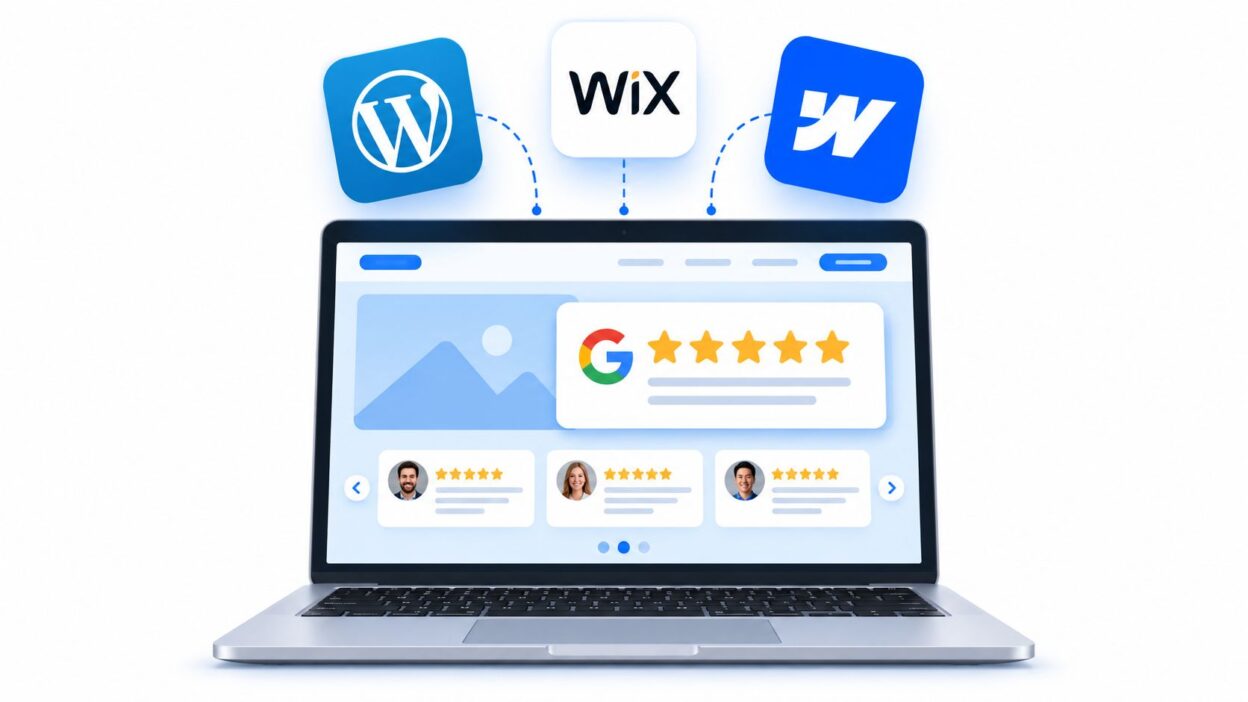
Four paths come up again and again. No-code widget services move fastest, native Google Maps embeds stay closest to Google's own interface, CMS plugins fit WordPress-heavy teams, and custom Places API builds give developers the most control. Each option has trade-offs. Native embeds are lighter to launch, but they give you less control over layout and caching. Third-party tools usually handle styling better, but they need more attention when reviews stop syncing or a theme update breaks the card size. If you're also aligning the review block with local visibility, local SEO tips for Melbourne stores connect review placement to broader local discovery.
That maintenance gap is where a lot of widgets go stale. Auto-sync may fail without notice, cached versions can keep old star counts on page, and responsive layouts often break first on smaller screens. A widget only keeps working if someone checks refresh behavior, mobile wrapping, and whether the embed still loads after a plugin or theme change.
For teams shipping locally focused pages, the job is not just showing proof. It is keeping that proof current, readable, and positioned where visitors see it before they leave.
Setting Up a Google Review Widget Step by Step
The setup usually starts with one missing piece, the Place ID. If you already know your Google Business Profile, you can connect that directly in some tools. If the widget expects a Place ID, use a finder tool first, then paste the result into the widget dashboard before you touch design settings. For a quick workflow, the Bragly Google Place ID Finder is one option people use to get past that first blocker.
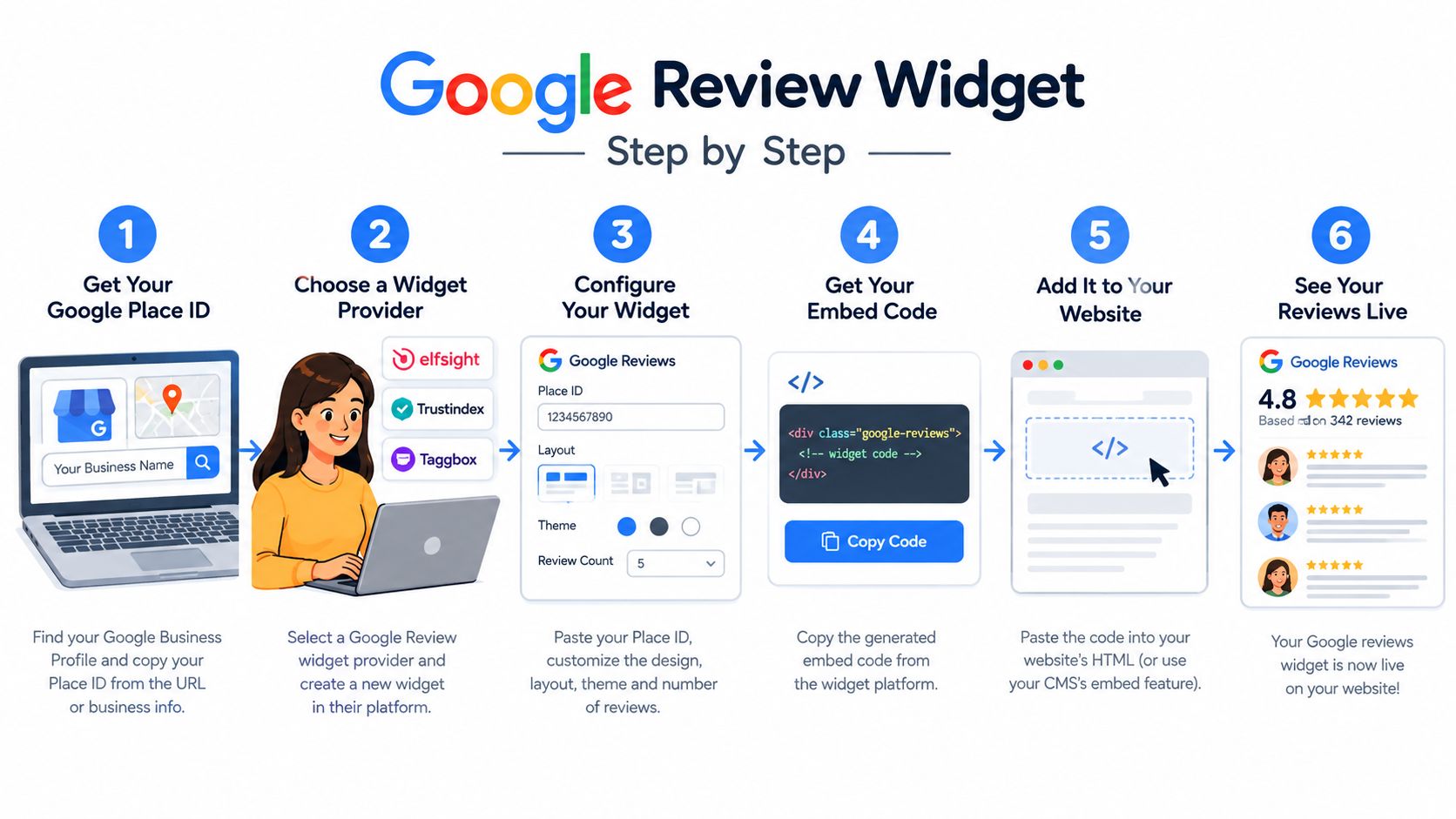
Choose the layout before you embed anything
Don't paste code first and design later. Pick the format that matches the page, a carousel for narrow spaces, a grid for dense proof, a badge for compact trust, or a single review if the section needs one strong quote. Most widget dashboards let you set that before the snippet is generated, and the layout choice affects how much CSS cleanup you'll need after launch.
Once the layout is selected, copy the generated embed snippet and place it where your site builder expects it. In WordPress, that's usually a custom HTML block or shortcode inside a reusable block. In Webflow, it typically goes into an Embed component, often inside a Collection page when the reviews need to be tied to dynamic content. In Wix, an HTML iframe element with custom dimensions is the safer route, and it needs HTTPS only. In custom HTML sites, the script tag usually goes just before the closing body tag.
Practical rule: if the widget needs JavaScript, test it in the exact template you plan to publish, not just in a sandbox page.
The optimized local SEO guide is useful context if you're wiring this into a broader local presence, because widget placement and profile setup usually need to align.
A snippet alone isn't the finish line. Most sites still need style tokens, spacing tweaks, or CSS overrides so the widget doesn't look pasted on. Custom builds can also need a server endpoint that caches the Places API response, especially when you want to stay under quota and avoid hitting the API on every page load. On Webflow and Wix, safe-content rules and editor constraints often mean the final version needs one more pass after the first render.
Choosing the Right Embedding Approach for Your Stack
The better choice is the one that matches your team's capacity after launch, not just the fastest way to get reviews on the page. A solo founder usually needs the lowest-maintenance option. A marketing team with developer support can tolerate more setup if the widget needs tighter styling, faster page loads, or page-specific layouts.
Use this matrix to compare effort, design control, and the work required after the widget goes live.
| Embedding Approach Comparison | Setup Effort | Design Control | Cost | Maintenance Burden |
|---|---|---|---|---|
| No-code widget service | Low | Moderate | Recurring fee | Low if auto-sync stays reliable and refreshes are visible after cache clears |
| Google Maps embed snippet | Very low | Low | Free | Low, but layout control is limited and mobile fit can break if the container is narrow |
| CMS plugin | Low to moderate | Moderate | Free tiers exist | Moderate, especially when theme updates or plugin changes affect styling |
| Custom Places API build | High | High | Dev time plus API management | Higher unless caching, monitoring, and response handling are wired up from the start |
A no-code widget service is usually the quickest path if you need something live without touching code. A native Google Maps embed stays official and free, but it rarely gives you the review presentation most conversion pages need. CMS plugins sit in the middle, useful when you want control without a full custom build, yet they often depend on the theme for schema, spacing, and responsive behavior.
Match the path to the team, not the trend
Custom builds make sense when markup, caching, and page-level presentation matter more than launch speed. They give you the most control, but they also make you responsible for key rotation, browser rendering, and failures that show up only after a cache layer or CDN starts serving stale content. Google's Business Profile API policies restrict abusive behavior and require express consent for automated actions, so reply workflows and connected features need to be planned before you ship. The Bragly integration page is useful if you want to compare a direct Google sync with a broader testimonial workflow.
A lot of teams choose the easiest option first, then discover the maintenance gap later. Auto-sync can lag, embeds can stop updating behind cached pages, and responsive layouts can break when a theme or editor changes the container width. That is why the right stack is the one that still looks current after launch, not the one that merely passed the first preview.
Where to Place Reviews for Maximum Conversion
Placement does more work than volume. A widget buried in the footer is weak social proof. A compact review block near a call to action can change the feel of the entire page because it answers the buyer's main objection right where that objection appears.
Map the placement to the buying stage
Homepage hero sections work best for first-impression trust. Pricing pages and product pages are where people compare options, so review cards near the pricing table or product detail area usually carry more weight than a generic testimonial strip. Checkout and cart pages need something smaller, often a badge or tight review snippet near the CTA so the final click feels safer.
The best placement is the one that meets the objection before the visitor leaves the page.
That's also where auto-sync matters. A widget that froze on a few old reviews signals neglect, especially when competitors are showing fresher proof. Use filters carefully, keep the reviews current, and let the most relevant comments surface in context instead of hiding the strongest lines in a long feed.
Google API Rules and SEO Impact You Should Know
The compliance layer is where teams often slip. Google's Business Profile APIs prohibit abusive behavior and require prior specific and express consent for automated review replies, Q&A actions, listing creation, and listing edits. Review responses still have to stay within Google's content rules. If your widget uses a live Google connection, that governance matters as much as the design Google Business Profile API policies.
Google also draws a line around review snippets in Search. Since 2019, it has said review snippets will not be shown for pages that use a third-party widget to display reviews about a business when the entity being reviewed controls the reviews itself Google Search review snippets guidance. A widget can still help on-page trust, but it does not automatically make a page eligible for rich results.
Schema, source ownership, and what Search reads
Self-sourced reviews, meaning reviews collected and published on your own site, give you more control over Review or AggregateRating markup. Imported reviews create a messier setup, because the source, display layer, and ownership are split across systems. Google's reviews API documentation also says the Reviews API allows merchants to get reviews and reply to reviews on a business profile, and the FAQ notes that seven APIs need to be enabled in the Google Cloud console for Business Profile access Google Business Profile APIs FAQ.
For maintenance, the safer setup is the one your team can keep stable after launch:
- Cache API responses server-side, so every page view does not hit the source directly.
- Log consent for any automated reply flow, then keep that record with your integration notes.
- Avoid self-serving review markup on pages where the reviews come from a third-party widget.
- Check how the widget behaves after cache clears, theme changes, and mobile breakpoints, since that is where stale ratings and broken layouts usually show up first.
Polling too often creates cost and cache problems, while webhook-based sync or cached retrieval is usually easier to maintain than calling an API on every page load. That is the part many teams miss. The launch is not the finish line, because the widget has to stay current, render well on smaller screens, and keep its compliance posture intact after the first week of traffic.
When Google Reviews Alone Are Not Enough
Google is often the right starting point, but it's not always the whole answer. If your audience also checks industry platforms, marketplace reviews, or peer-validation sites, a single-source widget can feel too narrow. The risk isn't only visual, it's strategic, because one platform becomes a single point of failure if a listing has issues or the review mix shifts in a way that doesn't reflect the full customer story.
A layered approach usually works better. Use Google for broad trust, add one vertical-specific source for niche credibility, and keep first-party testimonials on your own site so you own the schema and the presentation. That keeps your proof resilient without forcing every page to rely on one ecosystem.
The trade-off is operational overhead. More sources mean more moderation, more layout decisions, and more consistency work across mobile breakpoints. If you're also handling negative feedback, handling negative reviews is part of the same reputation system, because the widget only helps if the underlying response process feels credible.
Keep the stack honest and manageable
A Google-only widget is often enough for local discovery pages, but it can be too thin for brands that sell across multiple categories or to audiences with different trust habits. If you've got the team capacity, the layered model usually ages better than a single-source setup.
The testimonial widgets feature page is a good example of how multi-source display is framed in practice, because the value isn't just in showing reviews, it's in organizing them in a way that fits the page.
Keeping Your Widget Fresh After Launch
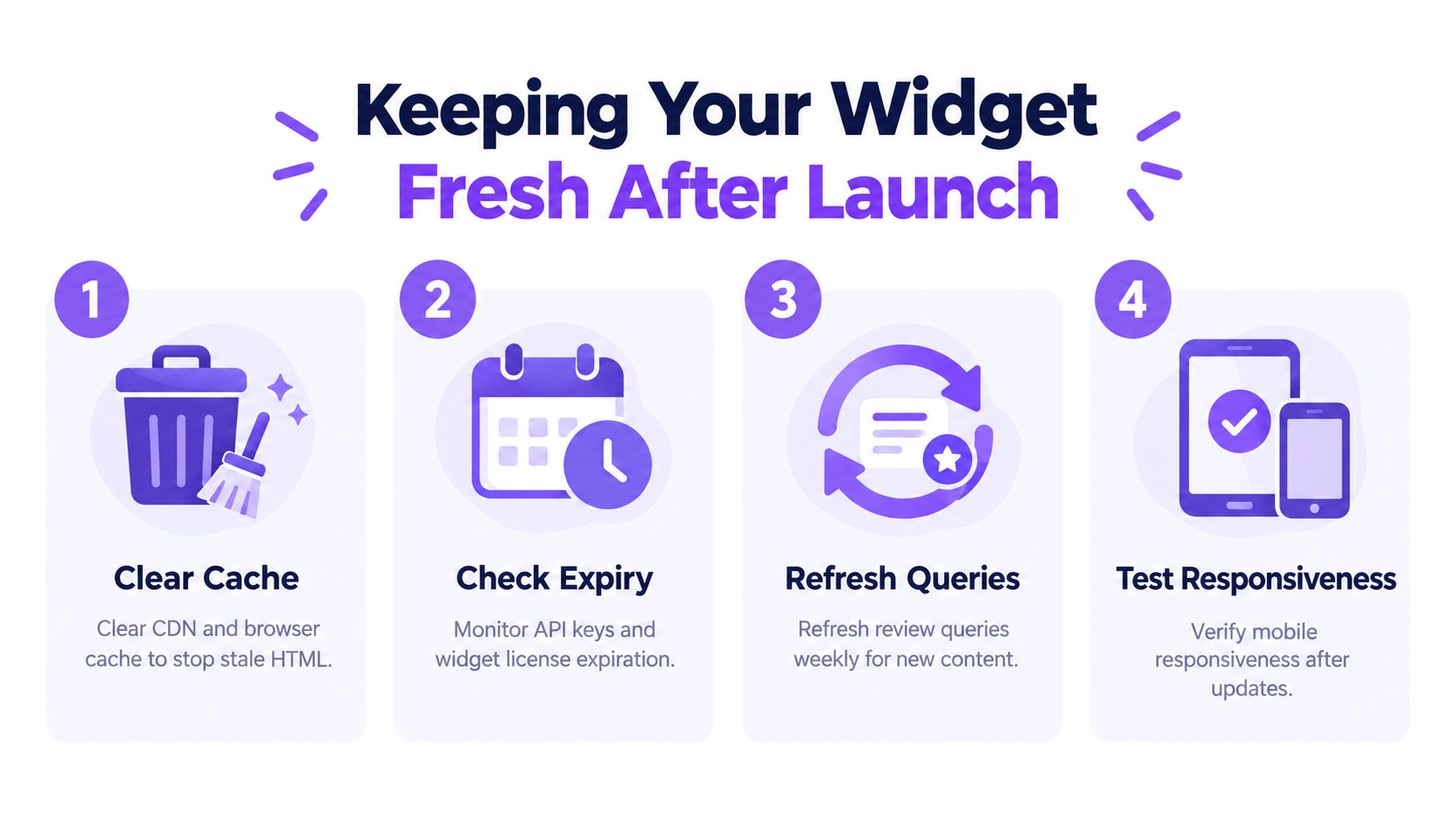
Most widgets look fine on day one and then rot without warning. The usual failure isn't dramatic; it's subtle. A CDN serves stale HTML, a credential gets rotated, a script gets blocked, or a parent container changes width and the widget collapses in a way nobody notices until a customer complains.
The first thing to monitor is cache. If your CDN or browser cache holds old markup, the widget may look connected while showing stale content. The second is connection health, because expired or revoked Google API credentials can stop sync without breaking the whole page. The third is script delivery, since aggressive cookie banners and ad blockers can block third-party code. The fourth is layout drift, which shows up when another template edit changes the width of the parent container and the widget no longer fits cleanly.
A small routine catches most problems
A weekly purge of cache is usually enough for sites that update review widgets regularly. Check the Places API key status monthly if your setup uses Google credentials directly. Test the embed in an incognito window with extensions enabled so you can see what blocked scripts or privacy tools do to the page. After any major template change, audit the parent container's CSS before the widget ships.
Maintenance rule: if the widget hasn't been looked at in weeks, it's no longer a live trust signal, it's old HTML with a review label on it.
The quickest monitoring routine is simple. Check the embed URL, confirm the connection status, and grab a mobile screenshot once a week. That small habit catches the majority of silent failures before visitors see them, and it keeps the widget feeling current instead of abandoned.
If you want a review widget that's easier to keep current across changing pages, layouts, and sources, Bragly gives you no-code testimonial widgets, auto-sync, and a simple way to manage social proof without rebuilding every page by hand. Visit Bragly and see how it can fit into your website workflow.