
Looking for a Shorter Overview?
AI Summary
Key Moments
Distinct roles of reviews and testimonials
Reviews establish business credibility independently; testimonials clarify specific outcomes for engaged buyers.Legal compliance and record keeping
Maintaining detailed audit trails ensures authenticity and compliance with the FTC’s Consumer Reviews and Testimonials Rule.Effective collection and moderation
Use neutral, broad invitations and consistent moderation to gather representative, decision-useful feedback.Strategic placement and content matching
Align review or testimonial format and placement with the buyer’s decision stage and relevant objections.Adding more five-star quotes isn't a complete trust strategy. Buyers also need to know who left the feedback, whether the experience resembles their own, and what the business chose not to show.
Reviews and testimonials work best as one trust system, not separate collections of praise. Third-party reviews help people investigate a business independently. Testimonials help them understand a particular result. Both need clear sourcing, careful editing, and records that explain how the feedback reached your website.
Reviews and Testimonials Compared Side by Side
A review is customer feedback published on a platform the business doesn't control, while a testimonial is customer feedback the business gathers or selects for its own channels.


That's a useful working distinction, rather than a rigid definition. A customer can post a review on Google, then give permission for an excerpt to appear as a testimonial on your service page. The experience stays the same, but the publishing context changes.
Reviews and testimonials compared
| Attribute | Review | Testimonial |
|---|---|---|
| Who writes it | A customer, on a platform you don't control | A customer, usually invited by the business |
| Where it lives | Google, Trustpilot, G2, and similar sites | Your website, emails, landing pages, or video library |
| Who controls the wording | The customer | The customer, with faithful cleanup or trimming by agreement |
| Typical format | Star rating with short text | Quote, short paragraph, or video |
| Typical length | One to a few sentences | One to four sentences, or a 30 to 90 second video, as an editorial guideline |
| Verification | Platform account, experience checks, and removal rules | Your own collection and verification records |
| Main legal rule | FTC ban on fake reviews and incentives tied to sentiment | Same FTC rule, including no material misrepresentation of the experience |
What the differences mean for buyers
A platform account gives a buyer somewhere to investigate, but it isn't automatic proof of a genuine purchase. Likewise, a named testimonial isn't verified just because it includes a portrait. Verification means having a defensible connection between the person and the experience.
Third-party discovery matters because buyers don't necessarily stay on your website. In BrightLocal's 2024 Local Consumer Review Survey, based on a representative panel of 1,141 U.S. consumers, 75% always or regularly read online reviews, and 77% used at least two review platforms when deciding whether to use a local business.
Your website therefore shouldn't try to replace independent review profiles. It should help visitors move between a useful excerpt and its original context.
Say a cleaning company receives praise for arriving on time. On a third-party profile, that review contributes to a broader picture of reliability. On an office-cleaning page, the same feedback can address a specific concern about opening the building before staff arrive.
Practical rule: Reviews help strangers establish that your business is real. Testimonials help an interested buyer understand a specific outcome.
Why Each Format Moves Buyers Differently
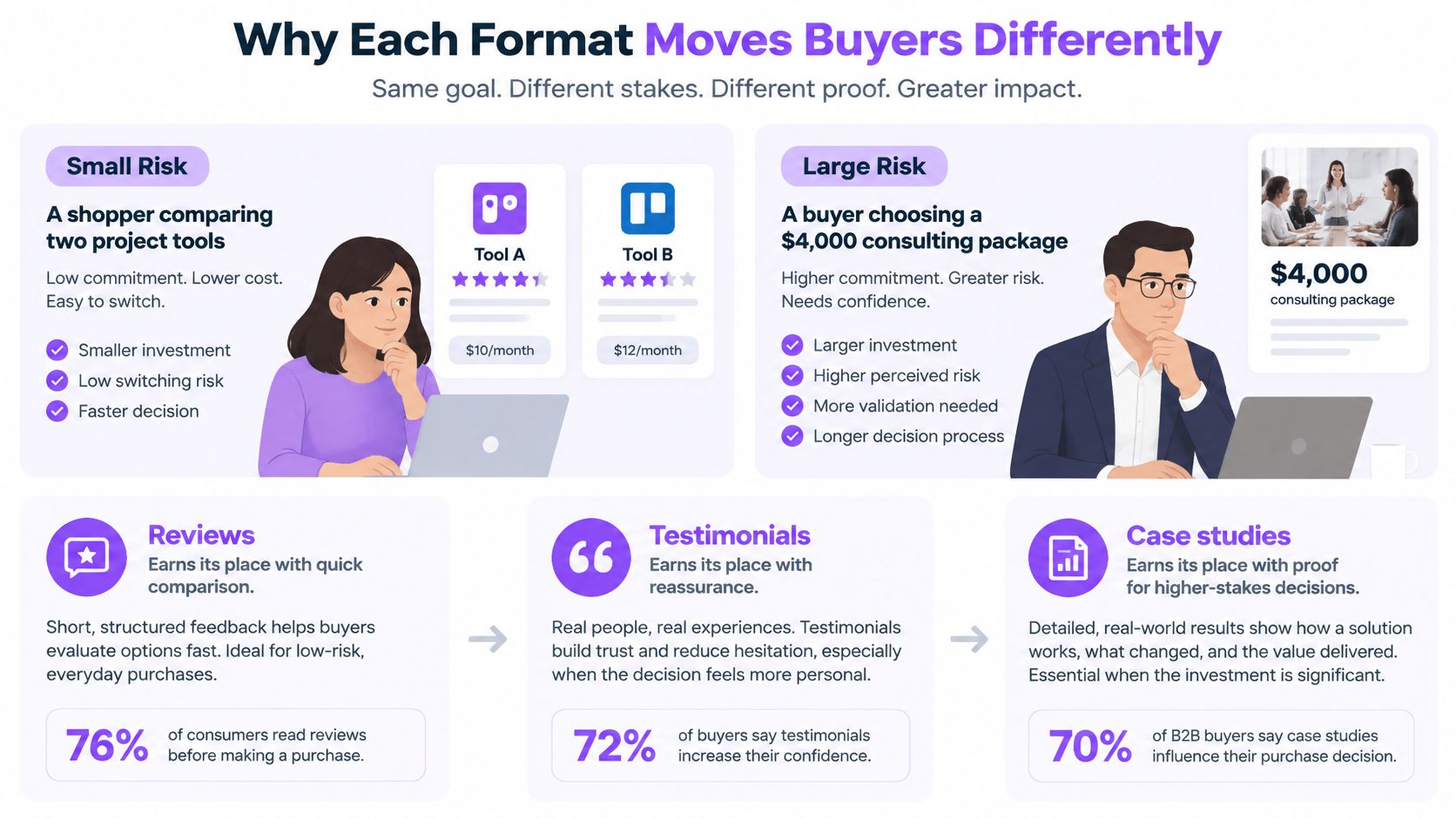
A shopper comparing project-management tools may face a modest, reversible decision. A buyer considering, say, a $4,000 consulting package needs more reassurance about fit, delivery, and what happens if the engagement disappoints.
The useful question isn't which format is better. It's which uncertainty the buyer still needs to resolve.
Reviews help buyers compare
Reviews let buyers look for patterns across independent accounts. Someone choosing a project tool might check whether users mention confusing permissions, slow support, or an easy migration.
The commercial effect can be substantial. Northwestern University's Medill Spiegel Research Center found that displaying five reviews increased purchase likelihood by 270% compared with displaying none, with marginal benefits diminishing rapidly afterward; review display increased conversion by 190% for lower-priced products and 380% for higher-priced products, while purchase likelihood typically peaked between 4.0 and 4.7 stars and declined as ratings approached a perfect 5.0.
These are findings from product-review research, not promised returns for a consulting business or software company. They support a useful direction: establish credible evidence early, and provide richer context when buyers have more at stake.
They don't support manufacturing a particular rating. A strong score with understandable limitations can be more believable than an apparently flawless record.
Testimonials answer the remaining objection
A testimonial is most useful when it addresses something a buyer can't settle from an average rating.
For a software buyer, that might be whether a small team can complete setup without technical help. For a consulting buyer, it might be whether the consultant understands a particular industry or leaves the team able to maintain the work afterward.
Compare these hypothetical descriptions:
- Generic praise: The customer says the service was excellent, without explaining the work.
- Decision-relevant detail: The customer describes the starting problem, what the provider delivered, and what became easier afterward.
- Higher-stakes evidence: A case study adds scope, constraints, and supporting documentation around the customer's account.
A detailed testimonial still isn't a guarantee. Preserve the circumstances that made the outcome possible, especially if the customer had unusual resources or support.
Lead with reviews for low-price, frequent purchases. Lead with relevant testimonials for high-ticket and service decisions, while keeping independent feedback accessible in either case. Expensive pages need more useful evidence, not a larger pile of praise.
Legal Rules and the Audit Trail You Need
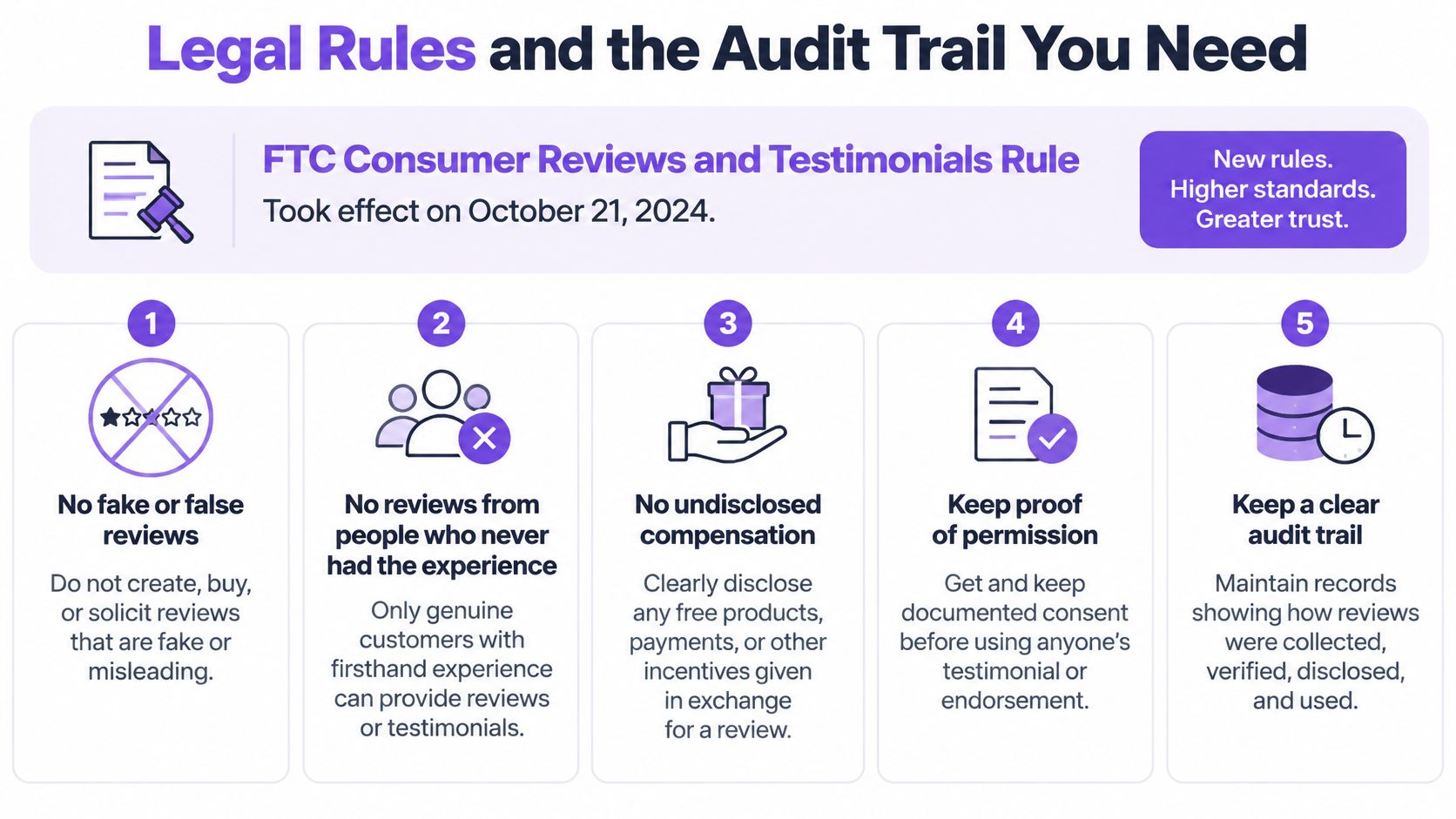
The U.S. FTC Consumer Reviews and Testimonials Rule took effect on October 21, 2024, prohibiting fake or false reviews, testimonials that materially misrepresent an experience, and compensation conditioned on a particular sentiment; its guidance also explains potential liability for disseminating reviews a business knew or should have known were fake or false.
In practice, ask for authentic feedback without steering the rating. Keep the original submission, record any cleanup, and don't turn a qualified customer comment into an unconditional endorsement.
Keep a record before publishing
A sentiment-neutral discount for leaving feedback may be permissible under FTC rules when appropriately disclosed, but a discount requiring a five-star review is prohibited. Platform rules can be stricter, so this isn't permission to run an incentive campaign everywhere.
Audit record fields
| Record field | What to store | Why it matters |
|---|---|---|
| Verification status | Confirmed real experience and reviewer identity | Helps exclude nonexistent people and invented experiences |
| Collection date | When and how feedback was requested and received | Establishes age and collection context |
| Incentive disclosure | Any reward, its terms, and proof it wasn't tied to sentiment | Supports disclosure and incentive compliance |
| Source link | Original review URL or retained form-submission reference | Makes the origin traceable |
| Edits and consent | Original text, each cleanup, and written consent for video | Protects against materially altered quotes and permission disputes |
| Representativeness check | Whether the displayed set fairly reflects the full record | Guards against implying a curated set is complete |
Skepticism makes this record useful beyond compliance. BrightLocal's 2025 U.S. survey found that 42% considered a review suspicious when it might be part of a paid or incentivized agreement, while only 24% felt confident spotting fake reviews.
Our guide to what makes product testimonials reliable offers a useful companion to this record-keeping approach. Reliability depends on traceable experiences, not polished presentation alone.
Run a publication check
In Bragly, submitted testimonials land in the dashboard, where you can approve, tag, and showcase them from one place. Keep the supporting records alongside your workflow rather than assuming approval itself proves authenticity.
- Confirm the experience: Match the submission to a real customer interaction.
- Record collection context: Save how and when you asked.
- Check incentives: Retain the terms and publish the necessary disclosure.
- Confirm permission: Record consent for video and intended reuse.
- Preserve the original: Save unedited text and document subsequent changes.
Collecting Testimonials and Aggregating Third-Party Reviews
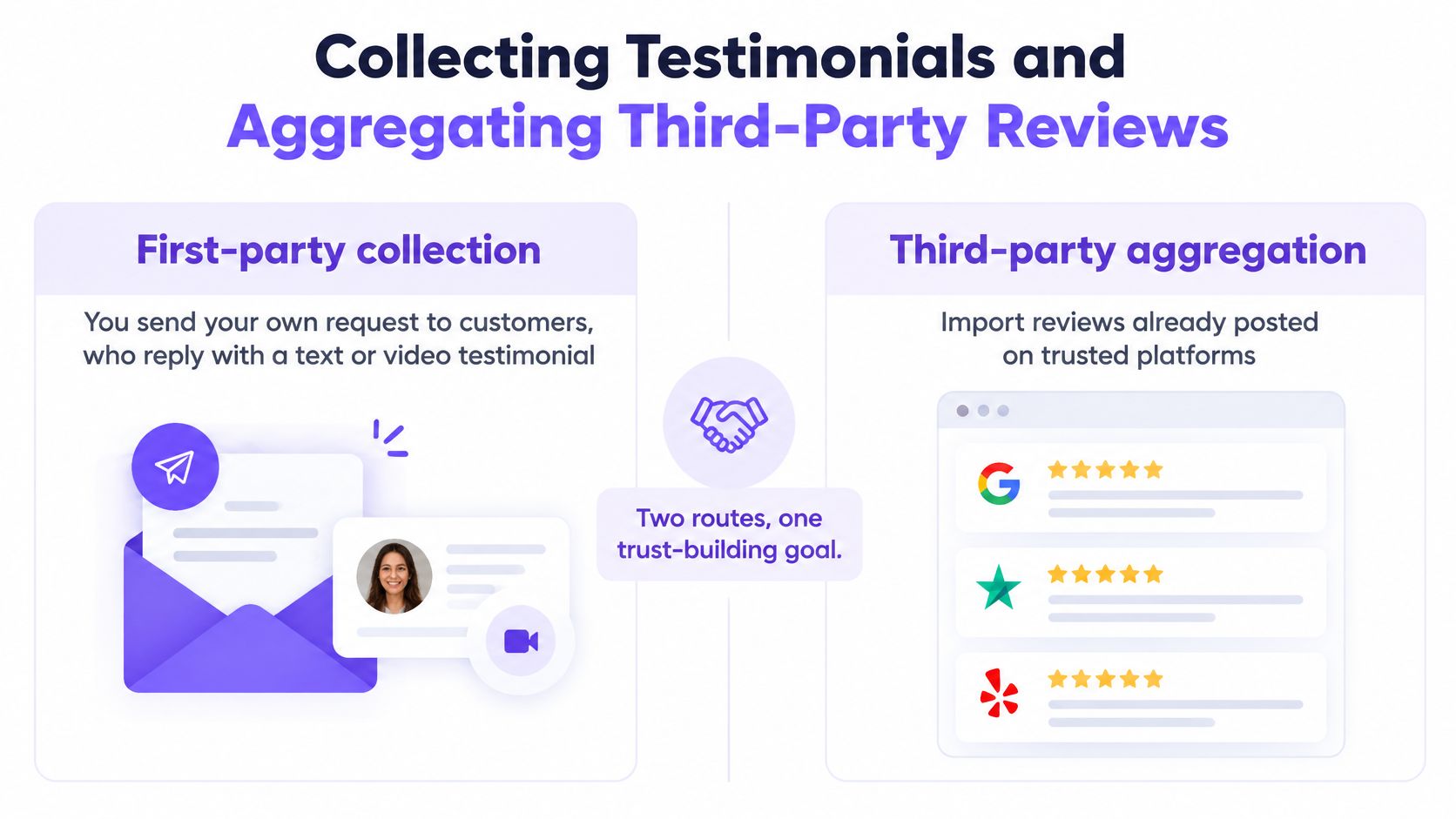
First-party collection means asking customers directly for text or video feedback. Third-party aggregation means importing reviews customers have already published on platforms such as Google, Trustpilot, or G2.
The routes solve different problems. Your own form lets you ask useful questions, while an imported review gives buyers an external source to inspect.
Collection routes compared
| Route | Control over wording | Credibility to buyer | Main risk |
|---|---|---|---|
| First-party text or video form | High control over questions, not the customer's answer | Stronger with identity and experience details | Looks curated if only praise is gathered |
| Imported third-party reviews | Low, the customer posts on the platform | Buyers can check the original source | Platform removals and rules apply |
| Aggregated widget on your site | Low over original wording, high over selection | Stronger with visible source labels | A carousel can hide context |
| Video testimonial | High control over prompts and editing, not the customer's meaning | Can provide useful detail for high-ticket decisions | Needs consent and editing rules |
Build a repeatable collection routine
Google Business Profile policy prohibits incentives for posting, revising, or removing reviews, discouraging negative reviews, and selectively soliciting positive reviews. Don't ask only the customers who gave your team enthusiastic private feedback.
- Define the customer group. For example, list everyone who completed a project during the last 90 days. Do not remove customers who complained.
- Use identical invitation wording. Send the same neutral request link across that group. Our guide to asking for reviews can help you write a request without coaching the answer.
- Ask for decision-useful detail. Request the product, starting problem, outcome, and usage conditions. Avoid prompts that tell customers which benefits to praise.
- Accept the format customers can manage. Our text and video forms work for customers who haven't reviewed anywhere, and one form link can collect unlimited testimonials. Retain permission for feedback received by email before republishing it.
- Import existing feedback. We support imports from platforms including Google, Trustpilot, and G2. Keep each source attached rather than making an imported review look like a direct submission.
- Tag for relevance. Organize by product, use case, and customer segment. Don't rely on sentiment as your only organizing label.
- Apply written moderation rules. Reject spam, private information, or unverifiable submissions consistently. Disliking a complaint isn't a moderation reason.
- Publish with context. Show the source and preserve important qualifications. Don't trim away a limitation that changes the meaning.
Product-specific questions matter too. For a concrete example, T1A Auto explains how shoppers can evaluate aftermarket part reviews, where compatibility and usage context deserve attention.
Ask the whole eligible customer group. Where incentives are allowed, reward participation rather than praise, and never use that approach where the platform prohibits rewards.
Placing Reviews and Testimonials Across Your Site
Place feedback next to the decision it helps a visitor make. A testimonial about onboarding belongs near setup information, not only on a general praise page.
A useful placement plan starts with the buyer's question: Is this business credible? Is this plan worth the price? Will this work for someone like me?
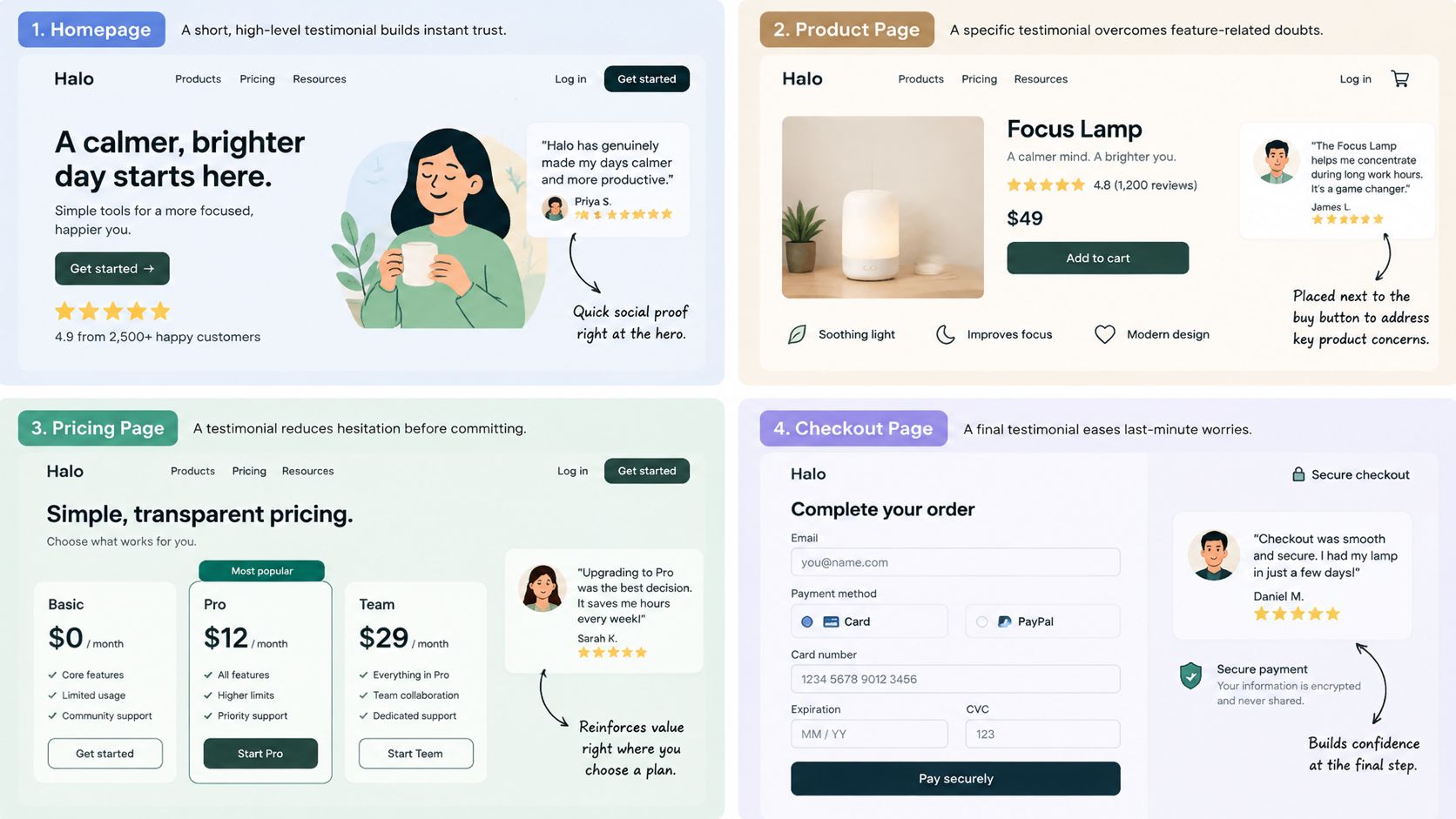
Testimonial placement by page type
| Page | Best format | Layout | Why it works |
|---|---|---|---|
| Homepage | Aggregated rating with source labels | Ribbon or badges | Establishes a basis for trust early |
| Pricing page | Two quotes naming plan and outcome | Quote list or grid | Addresses the value question directly |
| Product or service page | Video or detailed text on the main objection | Spotlight or carousel with source | Addresses the doubt relevant to that offering |
| Checkout or booking | One third-party review or badge | Compact badge | Provides reassurance without distracting from completion |
| Dedicated reviews page | Full set with filters | Grid or Wall of Love | Lets visitors explore neutral and negative feedback |
Match the evidence to the page
On the homepage, keep the summary short and identify where the rating comes from. Don't combine unrelated ratings into an unexplained score.
On pricing pages, select quotes that identify the relevant plan and what the customer achieved. A testimonial from a heavily supported enterprise customer may be a poor match for a self-service plan.
Product and service pages can support more context, including a video about the main concern. At checkout or booking, keep the evidence compact so it doesn't interrupt payment, accessibility, or form completion.
A dedicated reviews page serves a different purpose: investigation. Give visitors room to browse, compare, and find experiences that resemble their own rather than forcing them through a rotating selection.
Choose a layout visitors can inspect
Our widget layouts include company logo displays, video highlights, quote lists, ribbon carousel, avatar ribbon, and avatar mosaic options. Choose for readability first, especially when the feedback needs several sentences of context.
A static grid or full-review link is often easier to inspect than an automatically moving carousel. For more layout considerations, use our guide to testimonial website design.
You can choose which reviews to show, style a widget to match your site, and paste a single line of HTML where it should appear. Our Wall of Love is a fully branded reviews page that can be shared as a standalone link or linked from an existing site.
- Choose the decision. Identify what the visitor still needs to know.
- Select matching evidence. Use a quote that addresses it.
- Keep the source visible. Make further inspection straightforward.
- Check on a phone. Confirm text, controls, and video remain usable.
Negative Reviews and Keeping Displays Honest
A page containing only five-star praise can look staged. The problem isn't that positive feedback is unusable. It's that visitors may mistake your selection for the complete customer record.
Balanced evidence doesn't require giving every comment equal prominence. It requires honest labeling, consistent moderation, and a clear distinction between selected testimonials and an exhaustive review feed.
Selection isn't permission to suppress
The FTC's final-rule announcement explains that businesses cannot use unfounded legal threats, intimidation, or false public accusations to prevent or remove negative reviews, or misrepresent a selectively displayed set as most or all submitted reviews when negative feedback was suppressed.
The FTC's review-rule questions and answers also address undisclosed insider reviews and other practices that can make apparently independent praise misleading. Record customer relationships that could affect how readers interpret an endorsement.
A section labeled selected customer stories makes a narrower claim than a page labeled all customer reviews. Neither label excuses fabricated content or materially misleading edits.
Honesty check: Could a visitor compare your display with the underlying record and understand why you selected these items?
Use criticism to guide repairs
Build a complaint routine that assigns responsibility rather than merely tracking sentiment.
- Set a review window. Read low-rated feedback within a fixed internal response period and escalate safety, billing, or privacy concerns immediately.
- Group complaints by theme. Separate delivery delays, confusing setup, poor communication, and product faults.
- Fix and respond. Assign an owner to the underlying problem, then reply publicly without exposing customer information.
- Retain the record. Keep the negative item in your archive, including any resolution and subsequent update.
- Check the display. Include mixed feedback where you present a representative sample, and label curated selections clearly.
Our negative review insights scan 1- and 2-star reviews, summarize recurring themes, and recommend fixes for root causes. That can help you identify patterns without manually reading every complaint, although serious individual cases still need attention.
Marcus, Agency Owner, describes the benefit this way:
“Negative review insights are gold. I can see exactly what's going wrong without reading 50 complaints.”
Use the comparison test as a trust safeguard, not a legal guarantee: the displayed set should remain understandable and honest when viewed beside the full record.
Measuring Whether Reviews Work
An average rating won't tell you whether visitors found the evidence useful. Track coverage, freshness, responsiveness, credibility, and page outcomes together.
Start with practical questions. Do important products have any meaningful customer evidence? Are the latest reviews relevant to the current offering? Are unanswered complaints accumulating?
Build a decision-focused scorecard
| Measure | What to inspect | What it helps you decide |
|---|---|---|
| Evidence coverage | Products, plans, and use cases without feedback | Where to collect next |
| Freshness | Age of feedback and relevance to the current service | What needs updating |
| Response coverage | Unanswered reviews and unresolved themes | Where support needs an owner |
| Rating distribution | Positive, neutral, and negative experiences | Whether the average hides recurring problems |
| Source diversity | Dependence on a single platform | Where the trust record is incomplete |
| Page conversion | Purchases, bookings, or qualified inquiries | Whether a placement deserves further testing |
Watch for suspicious clustering, such as many similarly worded submissions arriving together. Investigate collection context before assuming either fraud or success.
Measure engagement as well as completion. Full-review clicks, filter use, and video plays can indicate what visitors want to inspect. They don't prove that a widget caused a sale.
Run a monthly comparison
- Record a baseline. Note each page's conversion before changing its review placement.
- Separate audiences. Compare price tiers and customer segments instead of blending unlike decisions.
- Inspect freshness. Track recent submissions and whether older quotes still describe the current offer.
- Read the distribution. Look beyond the average for repeated limitations.
- Flag unusual bursts. Check source, wording, timing, and collection campaigns.
- Review after 30 days. Start with the weakest page, but extend the test if traffic is too limited for a useful comparison.
Keep other page changes in your notes. A promotion, price change, or new traffic source can affect conversion, so a before-and-after improvement alone doesn't establish that reviews caused it.
Choose Your First Collection Step This Week
Choose the gap that currently prevents a buyer from checking your claims. You don't need to rebuild every review profile or redesign the whole site before making a useful improvement.
Use your starting position to choose the work:
- You already have third-party reviews. Import them and tag each item by product and use case. Preserve the original source so you can select relevant evidence without losing its context.
- You have neither reviews nor testimonials. Create a request link and send the same neutral invitation to recent customers. Make it easy to describe both what worked and what could improve.
- Your pricing page lacks evidence. Add a pair of genuine quotes that name the plan and outcome. Don't use a broad endorsement to imply a result the customer never described.
- Negative reviews are unanswered. Respond and assign the unresolved problems before expanding your display. Publishing more praise won't repair an unaddressed service failure.
Keep the first test small
Test an import and a widget on a single page before making a paid decision. Getting started with Bragly is free, and no credit card is required.
Set a 30-day checkpoint to inspect placement, visitor behavior, and whether any page presents praise without enough context. Keep the test notes so your next change responds to an actual gap rather than a preference for a different layout.
Show the source, and keep a record of how each item was gathered.
Bragly brings testimonial collection, third-party review imports, tagging, and website widgets into one workflow. Visit Bragly to collect or import your first feedback, then publish a source-labeled widget on the page where buyers need reassurance most.