Looking for a Shorter Overview?
AI Summary
Key Moments
Ask Immediately after Service
Request reviews within 24 hours while customer satisfaction is high to maximize response rates.Make Review Requests Easy
Use direct links, QR codes, and simple follow-ups to remove friction and increase reviews.Use Multiple Channels
Combine email, SMS, in-store signage, and website buttons to reach diverse customers effectively.Respond to Every Review
Reply to all reviews within a week to show you care and build customer trust.Quick Answer
Ask customers for reviews within 24 hours of a positive experience. Make it easy with a direct link, QR code, or email follow-up. Businesses that ask get reviews from 70% of customers. Use multiple channels (email, SMS, QR codes) and you’ll hit 26% response rates instead of 15%.
Key Takeaways
- Ask immediately: Within 24 hours of service completion, when they’re still happy
- Make it easy: Direct links, QR codes, email follow-ups—remove friction
- Use multiple channels: Email, SMS, in-store signs, website buttons
- Train your team: Make asking part of the checkout process
- Respond to everything: Answer within a week to show you care
- Skip incentives: Google will shut you down for offering discounts for reviews
- Track what works: See which channels generate the most reviews
Why Google Reviews Matter for Your Small Business
Google reviews aren’t optional. They’re how you grow.

Social proof wins sales. 95% of people read reviews before buying. When someone searches for your business on Google, your reviews are the first thing they see. Good reviews = instant credibility. No reviews = red flag.
Reviews directly impact your bottom line. Businesses with a 4-4.5 star rating make 28% more revenue. Companies with more reviews than their competitors? They make 54% more revenue. This isn’t theoretical. This is money.
Google ranks you higher when you have reviews. More reviews signal to Google that you’re active and trusted. That means you show up higher in local search results. More visibility = more customers.
Volume matters as much as rating. Customers want to see at least 112 reviews before they really trust you. A 4.8-star rating with 5 reviews? That won’t convince anyone. You need both volume and quality.
Common Mistakes When Collecting Google Reviews
Here’s what most small businesses get wrong:
Mistake 1: Never asking for reviews. This is the killer. 70% of customers will leave a review if you ask. But most businesses don’t ask. Customers assume you don’t care. They’re busy. Reviews take effort. You have to ask.
Mistake 2: Asking at the wrong time. Ask weeks later and they’ve forgotten. Ask within 24 hours of service completion. That’s when they’re still happy and most likely to follow through.
Mistake 3: Making it too complicated. Make customers hunt for the “Write a review” button and most will give up. Every extra step kills your response rate. Email alone? 15%. SMS alone? 20%. Email + SMS + direct link? 26%. Friction is your enemy.
Mistake 4: Offering incentives (and breaking Google’s rules). Don’t offer discounts or free stuff for reviews. Google will shut you down for it. Reviews have to be genuine.
Mistake 5: Ignoring reviews after they arrive. You got the reviews. Now respond to them. 53% of customers expect an answer within a week. Most businesses don’t respond—that’s your competitive advantage. Reply and you show you actually care.
Step-by-Step Guide to Collecting More Google Reviews
Step 1: Set Up and Verify Your Google Business Profile
You need a verified profile before you can collect reviews.
Claim or create your listing. Search for your business on Google Maps. If it’s there but not verified, click “Claim this business.” If it’s not listed, go to business.google.com/add to create a new listing.
Verify your business. Google needs to confirm you’re real. Pick your method: phone (instant), text, email, video, or postcard (14 days). Don’t change your name, address, or category while waiting—you’ll have to start over.
Fill in everything. Hours, address, phone, description, categories. Add photos—lots of them. Profiles with photos get 42% more direction requests and 35% more website clicks. Use real photos, not stock images. Update them regularly.
Step 2: Create a Direct Review Link
This is your most important tool.
Get your review link. Go to your profile, click “Read reviews,” then “Get more reviews.” Google gives you a URL and QR code. Customers click it and go straight to the review form—no searching.
Put it everywhere. Your review link should be in:
- Follow-up emails
- Text messages
- Email signature
- Website footer
- Social media
- In-store signs
- Receipts
- Your about page
Every place matters. The easier you make it, the more reviews you get.
Step 3: Ask at the Right Time
Timing is everything.
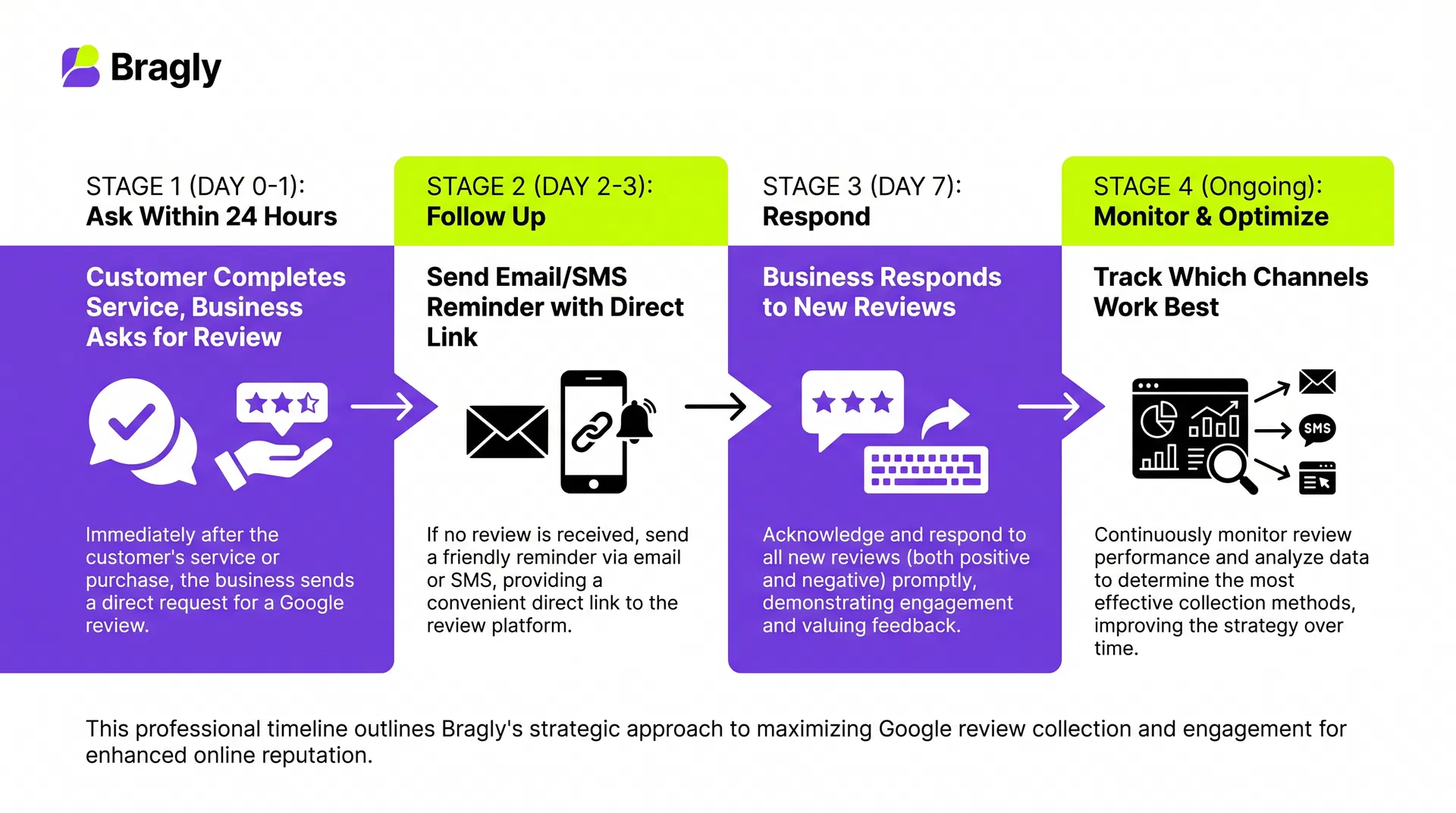
Ask immediately after service. Service businesses: ask within 24 hours. E-commerce: ask in the order confirmation or a few days after delivery. Restaurants: ask before they leave. Strike while the experience is fresh.
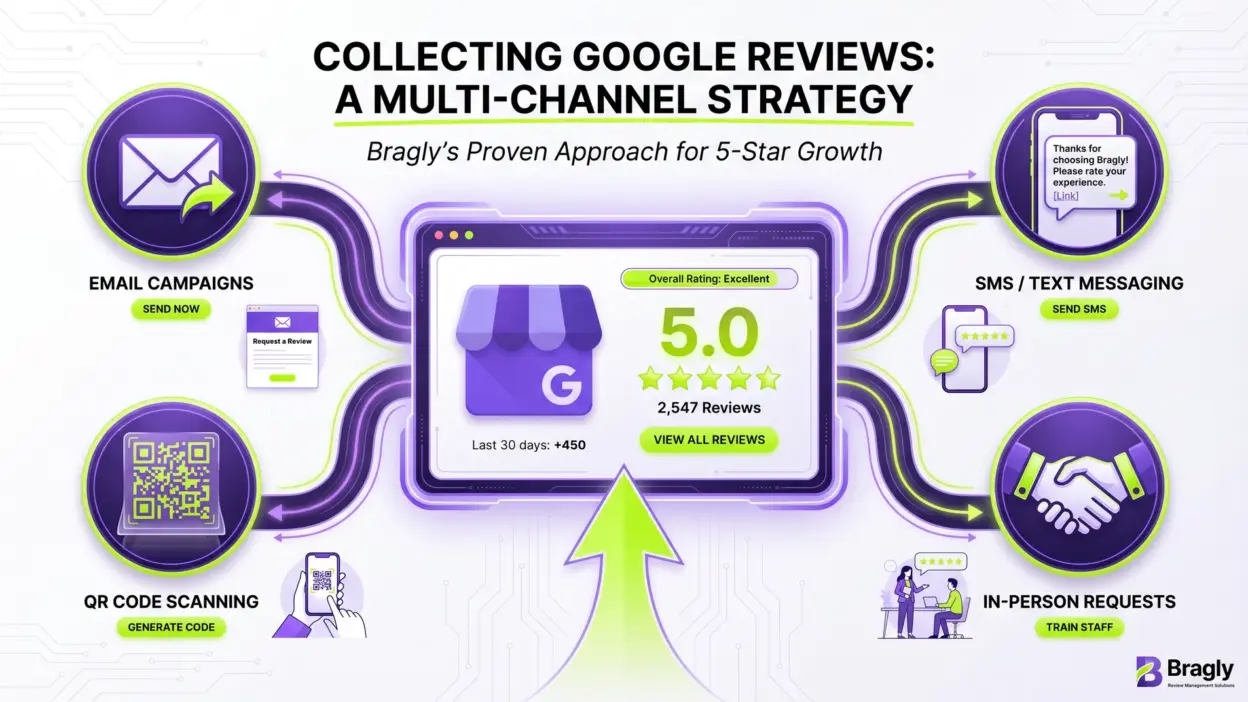
Ask face-to-face when you can. Face-to-face requests work better than emails. Train your team to ask during checkout: “We’d love your feedback. Here’s a QR code for our Google reviews.”
Follow up with email and SMS. Customers who don’t review immediately? Email them 2-3 days later. If you have their number, text them too. Email + SMS together works way better than either alone.
Step 4: Use Multiple Collection Channels
Different customers prefer different ways. Use all of them.
QR codes for in-store and print. Create a QR code from your review link (free QR generators work fine). Print it on:
- In-store signs
- Business cards
- Receipts
- Flyers
- Your window
QR codes kill friction. Customers scan and review. Done.
Email for follow-ups. Send a follow-up email 1-3 days after service. Keep it short: “We’d love your feedback. [Review link]”
SMS for urgency. SMS has a 98% open rate vs. 20% for email. Send: “Thanks for your business! Share your experience: [URL]”
Website and social media. Add your review link to your website footer, about page, and social profiles. Encourage satisfied customers to share.
Email signature. Add your review link to your email signature. Every email becomes a subtle review request.
Step 5: Train Your Team
Your employees are your best review collectors.
Make it part of your culture. Train everyone to ask every happy customer. Give them scripts and talking points.
Give them the tools. Hand out your review link and QR codes. Print stickers they can hand to customers.
Reward results. Track which team members generate the most reviews. Celebrate wins. This creates accountability and motivation.
Measure and optimize. See which team members and channels work best. Do more of that.
Step 6: Respond to Every Review
Responding matters as much as collecting.
Respond within a week. It shows you care.
Thank positive reviewers. Keep it short: “Thanks so much! We’re thrilled you had a great experience. We can’t wait to see you again!”
Address negative reviews professionally. Don’t get defensive. Acknowledge the issue, apologize if you’re wrong, and offer to fix it. Example: “We’re sorry this didn’t go well. Please call us at [phone] so we can make it right.”
Here’s the thing: Responding professionally to bad reviews actually builds trust. Potential customers see you care and take feedback seriously.
Comparison Table: Review Collection Methods
| Method | Ease of Use | Response Rate | Best For | Cost |
| Direct Ask (In-Person) | High | 35-40% | Service businesses | Free |
| QR Code (In-Store) | Very High | 30-35% | Retail/restaurants | Low (printing) |
| Email Follow-Up | Medium | 15% | All businesses | Free |
| SMS Follow-Up | High | 20% | All businesses | Low |
| Email + SMS + Link | High | 26% | All businesses | Low |
| Website Button | Medium | 10-15% | All businesses | Free |
| Social Media Share | Low | 5-10% | Social-active customers | Free |
FAQ: Collecting Google Reviews
Can I offer a discount for leaving a review?
No. Google will shut you down for it. Reviews have to be genuine.
How long does it take for a review to appear?
Most reviews show up within 24-48 hours. Google checks them for authenticity first.
Can I delete negative reviews?
You can’t delete them, but you can flag them if they violate Google’s policies (fake, abusive, spam, etc.). Instead of deleting, respond professionally to show potential customers that you take feedback seriously.
What’s the ideal number of reviews to have?
More is better, but quality matters too. Customers expect at least 112 reviews to fully trust a rating. However, even 10-20 high-quality reviews can significantly boost credibility and conversions.
Should I respond to every review?
Yes. Responding to all reviews shows you’re engaged and value customer feedback. It also encourages others to leave reviews. Aim to respond within a week.
Can I ask customers to remove negative reviews?
No. Asking customers to remove or change reviews violates Google’s policies. You can only respond professionally and offer to resolve the issue.
How do I track which channel generates the most reviews?
Use unique tracking links for each channel (email, SMS, QR code, website). You can use URL shorteners with tracking (like Bitly) to see which links get the most clicks. Alternatively, ask customers which channel they used when they review.
My business is brand new. How do I get my first reviews?
Start with your personal network. Ask friends, family, and early customers. Once you have 5-10 reviews, it gets easier. Focus on providing great service so people want to review.
Actionable Review Collection Checklist
Setup (Week 1)
- Verify your Google Business Profile
- Complete all profile information and add photos
- Generate your direct review link
- Create a QR code from your review link
- Set up tracking links for each channel
Implementation (Week 2-3)
- Print QR codes for in-store signage
- Train your team on asking for reviews
- Add review link to email signature
- Add review link to website footer
- Create email template for follow-ups
- Set up SMS reminders (if applicable)
Ongoing (Weekly)
- Ask customers in person for reviews
- Send follow-up emails to recent customers
- Respond to all new reviews within 7 days
- Track which channels generate the most reviews
- Celebrate team wins and adjust strategy
Final Thoughts: Your Review Collection Action Plan
Google reviews are your most powerful growth tool. They build trust, improve search rankings, and drive revenue. Yet most businesses barely collect them.
The strategy is dead simple: ask at the right time, make it easy, respond to everything. That’s it.
Start this week. Pick one channel—email, QR code, or in-person—and do it. Once it’s working, add another. In a month, you’ll have a system that runs itself.
If you’re juggling reviews across multiple platforms, Bragly’s testimonial widgets can centralize them all—Google, Trustpilot, Yelp, 30+ sources—in one dashboard. Then display your best reviews on your website for even more social proof.
The businesses winning right now aren’t waiting for reviews. They’re asking for them, responding to them, and using them to build real credibility.