
Looking for a Shorter Overview?
AI Summary
Key Moments
Centralize review monitoring
Use a single inbox or dashboard to track reviews from major platforms, avoiding manual checking of multiple sites.Prioritize timely responses
Respond to negative reviews quickly, ideally same-day, to recover trust and show customers their concerns matter.Collect fresh, relevant reviews
Ask for new reviews right after service satisfaction to maintain credibility and clear buyer hesitation.Maintain reputation steadily
Establish a weekly rhythm to review feedback, refresh website proof, and prevent reputation decay or spam attacks.You wake up, open your phone, and see a one-star review sitting at the top of your profile. The job was done right, the customer was usually happy, and now a stranger is scanning that review before they ever call, click, or walk in. That's reputation management for small business now, it isn't a side chore, it's part of how people decide whether you even get considered.
The hard part is that the decision rarely happens after a long conversation. It happens in a few seconds, while someone checks your rating, looks for recent reviews, and compares you to the next option. A business can have excellent service and still lose the click if the public proof looks stale, thin, or ignored.
Why Online Reputation Decides If Small Businesses Get Chosen
A bad morning on the owner side can turn into a bad buying decision on the customer side fast. One negative review lands, and the first instinct is often to reply, calm the situation, and move on. The problem is that the next buyer isn't reading it as a one-off complaint, they're using it as a shortcut for trust.

Reviews are now part of the buying path
The review screen has become the storefront for local businesses. One industry summary says 97% of consumers read online reviews for local businesses, 93% read them before making a purchase, and 81% use Google to evaluate local businesses. The same source says 71% won't choose a business with an average rating below 3 stars, while 73% only trust reviews that are less than 30 days old. That combination changes the game, because a high rating alone doesn't help if the proof looks outdated or too thin to believe. Online reviews statistics and trends for 2026
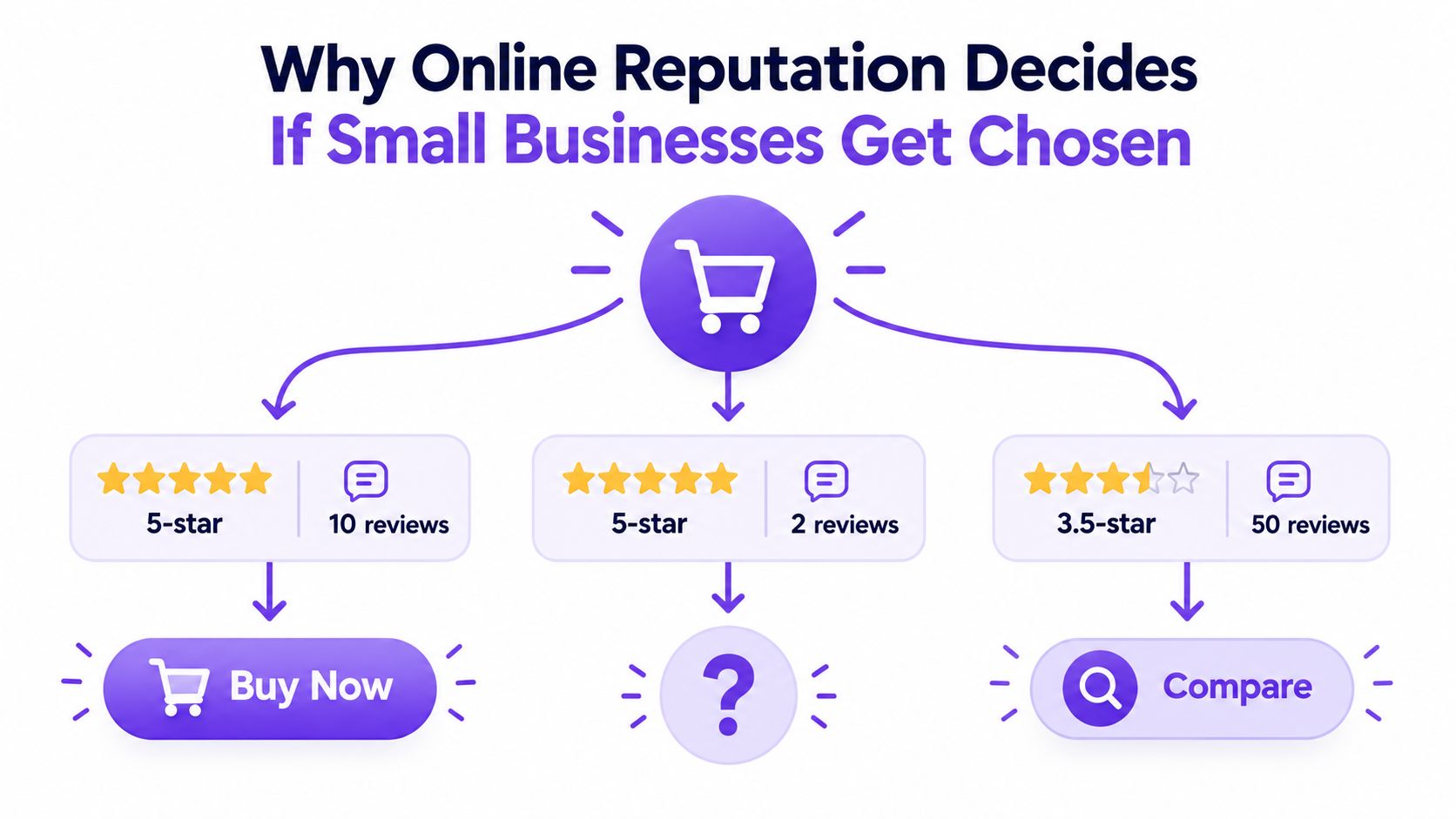
A useful way to think about it is as a trust gate. Buyers don't just ask whether you're good, they ask whether enough recent people have said you're good to make the risk feel acceptable. That's why a business with a smaller volume of fresh reviews can lose to a competitor with slightly weaker star ratings but a more convincing, current trail of feedback.
Practical rule: don't treat reputation as a cleanup job after something goes wrong. Treat it as an always-on proof system that keeps your business visible, believable, and easy to choose.
If you want a broader framing on that trust layer, the resource on how to build brand trust online is a useful complement to the operational work.
Freshness and volume matter as much as sentiment
The buying decision doesn't stop at stars. A 2025 report says 63% of consumers would lose trust in a business after seeing mostly negative written reviews, and trust in reviews as much as personal recommendations dropped from 79% in 2020 to 42% in 2025. That tells you the bar for credibility has risen, not fallen. Online reviews statistics and trends for 2026
A practical playbook has to cover three things, not one. It needs to show how to monitor reviews without living on every platform, how to respond fast enough to protect trust, and how to keep a steady flow of current reviews so the public profile doesn't age into irrelevance. It also has to do that without turning review management into another full-time job.
How to Monitor What Customers Say Without Checking Every Site
A lot of owners still check reviews the hard way. They open Google, Yelp, Facebook, TripAdvisor, and a handful of industry directories separately, then try to remember which location or service line got mentioned where. That works for a week, then it turns into missed replies, stale displays, and a lot of tab switching that doesn't move the business forward.
Centralize the few places that matter most
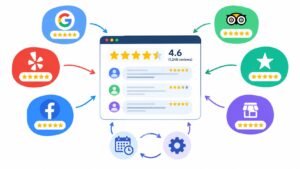
Review behavior is concentrated on a small set of platforms. One report says 88% of all reviews come from just four review platforms, with Google, Yelp, Facebook, and TripAdvisor dominating activity. That's the reason a central monitoring setup beats scattered manual checking. If most feedback lives in a few places, the workflow should pull those places into one inbox or dashboard instead of making the team visit each site individually. Online review stats
The simplest version starts with one internal owner, one review hub, and one daily check. The owner doesn't need to chase every mention by hand. They need a clean feed that shows what's new, what's negative, and what needs a response today.
A central hub also makes multi-location businesses easier to manage. Tag reviews by location, service line, or product category so a plumbing branch, a retail counter, and a delivery team don't all get lumped into one generic stream. That keeps the response and reporting side tied to the actual customer experience.
Use a digest, not constant distraction
Checking every site all day creates noise, not control. A better pattern is a daily digest for urgent items and a weekly summary for trend review. That way, the person responsible can see whether one team, one location, or one service keeps showing up in the feedback without constantly editing site pages or hunting through native dashboards.
Negative reviews should hit the top of the queue first. If a team has to choose between a routine five-star thank-you and a complaint that might still be influencing buyers, the complaint wins.
For businesses that want a tool-assisted setup, a central sync workflow like the one described at https://bragly.io/blog/sync-reviews can reduce the manual overhead of moving feedback from one source to another. The point isn't to collect more screens. It's to keep one current view of what customers are saying.
A good monitoring routine feels boring in the best way. New feedback shows up where the team already works, the right person gets the alert, and the business doesn't lose half a day to platform hopping. That's the difference between knowing about a problem and letting it sit there until the next buyer sees it first.
How to Respond to Reviews Quickly and Recover Trust
Speed matters more than polish when a real complaint shows up. A thoughtful reply that arrives too late still tells future buyers the business hesitated. A shorter reply that lands quickly, names the issue, and offers a next step usually does more for trust than a long explanation posted after the customer has already moved on.
Triage by sentiment before you write
A 2026 analysis of 229,882 Google reviews of small businesses found a sharp gap in response behavior. Only 9.8% of one-star reviews received a reply, while 29.3% of five-star reviews did, and negative-review replies arrived after an average of 19.5 days. That's a workflow problem, not just a tone problem. The gap shows why negative reviews need their own lane, because that's where trust recovery happens. Google review response study
The response order should be simple:
- One- and two-star reviews first. Route these for same-day handling whenever possible.
- Three-star reviews next. They often contain mixed feedback that can still be rescued with a useful response.
- Four- and five-star reviews last. These can be acknowledged with a fast template so the team doesn't burn time on praise that doesn't need a long reply.
A separate consumer expectation set says 89% of consumers expect a business to respond to its reviews, 81% expect that response within a week, and 19% now expect a same-day reply, up from 6% the prior year. Those expectations explain why a slow response can feel like a public silence, not a private delay. Online reputation management 2026 reviews and ratings playbook
Keep the response useful, not defensive
A review reply should do three things. It should acknowledge the issue, state the next step, and move the detailed fix offline if needed. What doesn't work is arguing in public, copy-pasting the same sentence everywhere, or pretending the review never happened.
For teams that need help drafting replies quickly, the ops playbook at how to respond to negative feedback is a useful reference point for tone and escalation discipline. A drafting tool like AI Review Responder can also help staff move faster when the message needs to stay brand-safe and consistent.
Document the follow-up in the same place every time. If the customer needs a callback, refund, service revisit, or manager review, the reply thread should record that handoff so nothing disappears into a staff member's memory. That's how a team keeps the response process from becoming a pile of isolated apologies.
The goal isn't to write perfect PR. The goal is to show the next buyer that a complaint gets seen, taken seriously, and handled fast enough to matter.
How to Collect Fresh Reviews That Clear the Trust Threshold
A quiet profile can hurt a business just as much as a bad one. Buyers want current proof, not a polished archive of praise from years ago. If the latest voice is missing, the business starts to feel stale, even if the average rating still looks fine.
Ask at the moment of strongest satisfaction
The best time to ask for a review is right after the customer has felt the value. That can be after a completed repair, a successful delivery, a solved support issue, or a clean checkout handoff. Ask too early, and it feels presumptive. Ask too late, and the feeling has already faded.
The request should be easy to finish. A short message, a direct link, and a plain note about where the review will help are usually enough. For service businesses, asking after a clear project milestone works better than waiting for a generic end-of-quarter sweep.
Fresh reviews do more than add volume. They keep the business believable when shoppers are filtering by recency instead of just average score.
Build proof by location or service line
One review feed rarely matches how people decide. A customer wants proof that the branch, team, or product they are considering has current positive feedback. Location-level and service-line-level collection solves that problem.
Small businesses typically do not need a dramatic surge of reviews. They need enough current proof to clear the buyer's hesitation. Reputation management for small business is not about chasing volume, it is about making sure enough fresh evidence is visible to pass the trust threshold.
A practical collection system also has to respect where the buyer is looking. That is why businesses should organize requests by the place or offer that needs proof most. A salon can ask by stylist, a contractor can ask by job type, and a store can ask by product line. The review library then becomes useful in the exact spots where buyers hesitate.
Analysts at Are small businesses facing a reputation crisis in 2026 say consumers pay close attention to recent reviews, and that weak recency can undercut trust even when the overall score looks fine.
Keep the ask polite and repeatable
The best request flow does not sound needy. It sounds like part of normal service. One follow-up is fine after a completed job, but repeated nudges can make a loyal customer feel cornered.
A practical setup for collection includes:
- A first-party form for collecting testimonials directly on the website.
- A short follow-up email or text after a positive interaction.
- A source-specific link for customers who prefer a familiar platform.
- A light reminder cadence that stops after the first nudge.
For businesses that want a collection workflow tied to site publishing, the guidance at asking for reviews is a useful companion. It pairs well with one simple rule, the ask should be brief, specific, and timed to the moment the customer feels taken care of.
How to Display and Manage Social Proof Across Your Website
Collected reviews don't help much if they sit in a dashboard no customer sees. The website has to turn that raw material into proof that matches the page the buyer is on. A homepage needs broad reassurance, a service page needs proof for that exact offer, and a checkout or contact page needs a final nudge that reduces doubt.
A review widget is useful when it does two jobs at once. It makes the site look current, and it keeps the proof aligned with the audience's intent. That's why tag-based curation matters, because the best testimonial for one page isn't always the best testimonial for another.
Match the testimonial to the page goal
A homepage can carry a high-level carousel or badge that shows general credibility. A service page works better with reviews that mention the specific service, turnaround, or experience the buyer cares about. A pricing or contact page should lean into reassurance, not feature lists, because the customer is usually trying to decide whether to take the next step.
Auto-sync is what keeps that display from aging out. When connected review sources refresh automatically, the widget doesn't need to be edited every time a new review arrives. That matters for small teams, because nobody wants to spend Friday afternoon copying testimonials into a homepage block that will be out of date next week.
Use the tooling that fits the site stack
No-code widgets make more sense than custom builds for most small businesses. Webflow, WordPress, and Wix can all display review sections without turning social proof into a development ticket every time the marketing team wants a tweak. For custom sites, copy-paste embeds and webhook support make it easier to slot review data into existing workflows.
A platform such as Bragly can centralize review aggregation, auto-sync connected sources, tag testimonials, and surface simple analytics so the right proof gets placed in the right spot. It's one way to turn scattered feedback into a managed website asset instead of a pile of screenshots.
Keep the display current without making it busy
Don't overfill the page with every review you've ever received. Older praise has value, but too much of it can crowd out the current proof that buyers care about most. A compact display with recent, relevant, and clearly sourced reviews usually earns more trust than a wall of indistinguishable testimonials.
Basic analytics help here. If a certain review format, source, or topic keeps getting clicked or featured, that's a sign the page is doing its job. If the widget is present but ignored, the layout probably needs less clutter and a tighter match to the page's purpose.
Consistency is the key. Every important page should demonstrate that the business is active, current, and trustworthy.
Keeping Your Reputation Strong and Fixing It When It Slips
A reputation system falls apart when it depends on heroic bursts of attention. The sustainable version is smaller and more boring. Someone checks the inbox, replies to the right review first, asks for fresh feedback from happy customers, and refreshes the site proof before it goes stale.
Use a weekly maintenance rhythm
A simple weekly rhythm beats sporadic panic. Check the new reviews, audit whether anything negative is still waiting, confirm that fresh-review requests went out, and make sure the website displays still reflect current proof. That's enough to catch the most common failure modes before they harden into a public pattern.
If the team is stretched, the cleanest priorities are obvious:
- Review inbox first: Handle complaints before anything else.
- Response quality second: Make sure replies stay calm and specific.
- Fresh proof third: Keep recent reviews flowing so buyers see active credibility.
- Website displays last: Refresh the front-end proof so it matches the current reality.
Don't let fake attacks or stale proof linger
Fake attacks and spammy review bursts should be documented, flagged, and escalated through the platform process instead of debated publicly. The public reply isn't the place to litigate whether a review is real. The goal is to show that the business watches its profile, reacts calmly, and doesn't crumble when something looks off.
Stale testimonials can be just as damaging as hostile ones. A page full of old praise subtly suggests the business hasn't earned new confidence lately. That's a subtle problem, but buyers notice it.
For teams trying to avoid spammy language in outreach and internal messaging, the spam words checker is a handy sanity check before sending review requests or follow-up copy that could sound pushy or promotional.
Measure progress with simple signals
The best signals are practical. New reviews are still coming in, response times stay short, negative complaints don't sit unanswered, and the site proof reflects current customer language. If those pieces are moving together, the system is working.
Reputation management for small business isn't about perfection. It's about making sure trust doesn't decay faster than you can replace it. When the workflow is centralized, fresh, and consistent, the business doesn't have to fight for credibility every morning.
If you want a cleaner way to collect, organize, and display customer proof without adding more manual work, Bragly brings the review workflow into one place. It helps businesses centralize testimonials, keep displays current, and manage social proof across the website with less day-to-day effort. Visit Bragly to see how that fits your review process.