

Looking for a Shorter Overview?
AI Summary
Key Moments
Ask the right questions
Tailor feedback requests to distinct purposes to avoid vague or mixed answers.Timing matters
Send feedback requests soon after milestones while the experience is fresh for more accurate responses.Match channel to relationship
Choose feedback channels that fit the client interaction for higher response rates and relevant input.Action on responses
Use initial feedback to route clients to testimonials or service recovery to build trust and improve.You can feel it when the project wraps. The invoices are sent, the deliverables are done, and you fire off a polite email asking what the client thought. Then nothing comes back, or worse, you get one vague compliment that tells you almost nothing.
That silence is usually not a wording problem. It's a sampling problem. Most client-feedback requests fail because they ask the wrong people at the wrong moment, through the wrong channel, and then pretend the result is representative.
Why Most Feedback Requests Fall Flat
Most founders blame the copy. They obsess over whether the subject line was warm enough or whether the request sounded too formal. That's usually the wrong diagnosis. A client can read a thoughtful message and still ignore it if the timing is off, the channel feels wrong, or the request asks them to do too much.


The mistake is treating how to ask feedback from client as a courtesy problem instead of a measurement problem. If you send a generic "How did we do?" message, you blur three different jobs into one ask, diagnostic feedback, testimonial collection, and relationship checking. Those are not the same thing, and clients answer them differently.
Ask the right question for the right purpose
A vague question produces vague answers. A client who just finished onboarding can tell you where friction happened, but only if you ask about that exact experience. SERVQUAL's core idea was built around this distinction, comparing expectations with what the client received, which is why questions about reliability, responsiveness, clarity, and promise-keeping are more useful than a lazy satisfaction score (SERVQUAL background).
The second mistake is believing a high response rate automatically means the feedback is representative. It doesn't. A small sample can still be statistically useful, and a larger percentage can still mislead you if only a thin slice of clients replied. Track invitations, completions, partial responses, and customer segment instead of worshipping the top-line percentage.
Practical rule: if you can't say who replied, when they replied, and what happened right before the request, you don't have feedback you can trust. You have noise.
Timing the Request to Match the Memory
A request sent right after the work ends gets cleaner answers. Wait too long, and clients start reconstructing the experience instead of reporting it. That is how you end up with vague praise, fuzzy criticism, and feedback that feels polite but not useful.
Separate diagnostic and relationship feedback
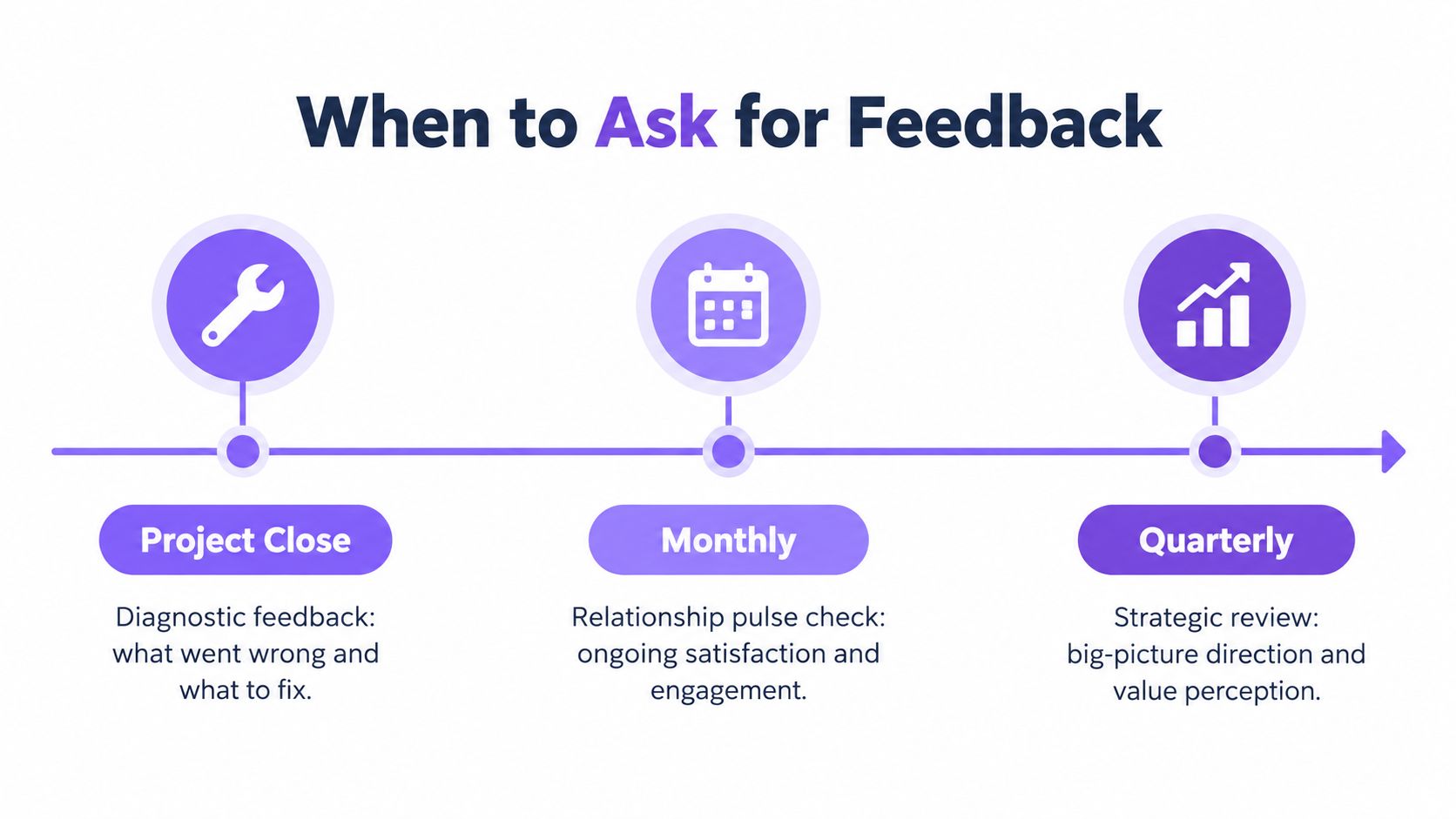
Diagnostic feedback belongs to an event. Use it after a closed project, a resolved support ticket, a finished onboarding session, or a delivered first result. Relationship feedback belongs on a steady cadence, where you can compare replies over time without mixing in project-specific noise. Send both at once, and the answers blur together.
Use a simple rhythm. Ask right after the milestone for the work that just finished, then run a broader relationship check-in on a fixed schedule. For many firms, twice a year keeps the relationship view stable without filling the inbox with noise.
Ask while the experience is still fresh
Transactional surveys work best when they go out quickly, usually within 24 to 48 hours of the milestone. After that, clients have to rebuild the experience from memory, and the details get thinner fast.
Channel choice matters just as much as timing. SurveyMonkey's platform data, as summarized by Dovetail, shows an average customer-feedback response rate of 31.81%, with email surveys at 49.17%, mobile in-app surveys at 34.37%, web-link surveys at 29.95%, SMS at 18.54%, and pop-up surveys at 3.65% (Dovetail benchmark data). That spread is the point. Do not treat the request as a generic message. Match the channel to the moment, or you will lose replies before you even get to the question.
If you are tracking when feedback gets asked versus when it gets answered, Bragly's review velocity calculator helps you keep the cadence honest instead of guessing.
Building a Two-Stage Request That Earns Replies
Most guides give you a sentence. You need a system. The best request starts small, gets one useful signal, and then routes the client into the right next step based on what they said.
Start with a short rating and one diagnostic question
The first touch should be short enough to finish in a minute. Ask one overall rating, one specific diagnostic question, and one open “why” prompt. That's enough to reveal whether the experience was clean or broken without turning the request into homework.
A simple version looks like this:
“Thanks for wrapping up the project with us. Could you rate the experience from 1 to 5? If anything felt rough, what part of the process caused it? And in one sentence, why did you choose that rating?”
That structure works because it respects effort. It also gives you a clean routing point. A strong rating can flow into a testimonial collection form, while a weak rating should route to a private service-recovery conversation.
Use the first answer to decide what happens next
Many teams waste the opportunity. They ask for feedback and then leave it sitting in a shared inbox. Instead, connect the first response to the next action. Positive responses can go into a collection flow for a written or video testimonial. Negative responses should trigger a private follow-up from someone who can fix the issue.
If you're using a form-based workflow, keep the fields tight. Show the client the milestone they just completed, the one rating question, one comment field, and one consent line if you plan to reuse the response publicly. That's enough. More questions will lower completion quality.
For teams building this into a workflow, Bragly's review request SMS tool is a practical example of how to keep the ask short while still capturing the response in the right place.
Keep the first request about the experience, not the praise. Praise can come later, after you've earned it.
Matching the Channel to the Client Relationship
Channel choice decides whose voice you hear.
Email works for considered feedback from known clients. In-app prompts work when the user is already inside the product. SMS works when you need a fast post-interaction response and do not need much depth. Face-to-face or video interviews fit strategic accounts where nuance matters more than scale.
Response rates from SurveyMonkey platform data summarized by Dovetail (Dovetail benchmark data) show the pattern clearly. Email sits at 49.17%. Mobile in-app is 34.37%. Web link is 29.95%. SMS is 18.54%. Pop-up is 3.65%.
| Feedback channel response rates by use case | Typical response rate | Best for | Weakness |
|---|---|---|---|
| 49.17% | Relationship-oriented feedback, post-purchase asks, detailed comments | Can feel easy to ignore if sent too broadly | |
| Mobile in-app | 34.37% | Contextual feedback from active users | Only reaches people currently using the product |
| Web link | 29.95% | Embedded forms on websites, support pages, post-task feedback | Can underperform if the invite lacks context |
| SMS | 18.54% | Quick ratings after a recent interaction | Too thin for nuanced answers |
| Pop-up | 3.65% | Interruptive prompts with very specific timing | Usually too easy to dismiss |
The point is not to chase the biggest benchmark. It is to match the medium to the relationship. If the client barely knows you, a casual pop-up will not produce thoughtful input. If the client is established and has just finished a meaningful milestone, email is usually the cleanest path.
Timing matters too. Use the channel that feels native to the moment. A considered review request should read like a professional follow-up, not a blast. If you need contextual usability feedback from an active user, ask inside the product while the memory is hot.
For teams building this into a workflow, the Bragly review request SMS tool is a practical example of keeping the ask short while still capturing the response in the right place.
Follow-Ups That Improve Reliability Without Annoying Clients
Send one polite reminder after a reasonable gap, then stop. More reminders do not improve accuracy, they train clients to ignore you. They also skew the sample toward people with unusually strong positive or negative opinions.
That is nonresponse bias in practice. The quiet majority stays out, while the loudest voices fill the inbox. You end up over-reading praise or anger and missing the middle.
Disclose consent and protect trust
If clients do not understand how their feedback will be used, they hesitate for a reason. State whether the response is anonymous, who will see it, and whether a quote might appear publicly. Give separate opt-ins for internal improvement and public publication, because bundling those choices makes people wary.
Make it easy to decline without penalty. A request that feels coercive damages the relationship faster than a request that is ignored.
Research on consent and psychological safety found that ambiguous language and limited choices increase perceived privacy threats and reduce perceived control. Keep the ask clear and brief. One reminder, one purpose, one clean decision.
Ready to Send Scripts for the First Ask and the Follow-Up
Use plain language. Don't dress it up. Clients don't need a clever request, they need a quick one that respects their time and makes the purpose obvious.
First ask after a completed milestone
“Thanks again for finishing the project with us. Could you take a minute to rate the experience and tell us what felt smooth or rough? If you're open to it, one sentence on why you chose that rating helps us improve the next client's experience.”
That copy works because it names the completed milestone, asks for a single rating, and keeps the open-ended part focused. It doesn't beg for praise, and it doesn't hide the purpose.
In-product prompt for active users
“You've completed the setup flow. How easy was that process, and what got in your way if anything did?”
That's the right shape for SaaS or product-led flows. The prompt is contextual, short, and tied to the actual task the user just finished. It should not ask about the entire relationship.
Follow-up reminder
“Just nudging this once in case it slipped past. Your feedback helps us fix what needs fixing, and we'll only use it for the purpose you choose.”
That sentence is calm, direct, and final. It gives one reminder, explains why the ask matters, and makes consent feel real instead of buried in fine print.
If the client already responded, suppress the reminder. Re-asking after a response is sloppy, and it tells them you aren't tracking your own process.
Turning Replies Into Published Social Proof and a Trust Loop
A reply is not the finish line. It's the raw material. If you stop at collection, you're just running an inbox operation. If you route the right feedback into publication, tagging, and follow-up, you build a trust loop that keeps paying off.
Positive first-party feedback can become a permission-based testimonial, while negative feedback becomes a service fix. That split matters. Don't pressure every respondent to publish publicly. Private improvement feedback and public social proof serve different jobs, and mixing them creates bias.
When a client does opt in, organize the quote by use case, product stage, or customer type so the right proof lands on the right page. Bragly's testimonial widgets are one way to display that material without making your site team rebuild the layout every time. If you want a broader perspective on why client reviews influence buying decisions, the guide to client reviews for law firms is a useful reminder that credibility comes from specifics, not generic praise.
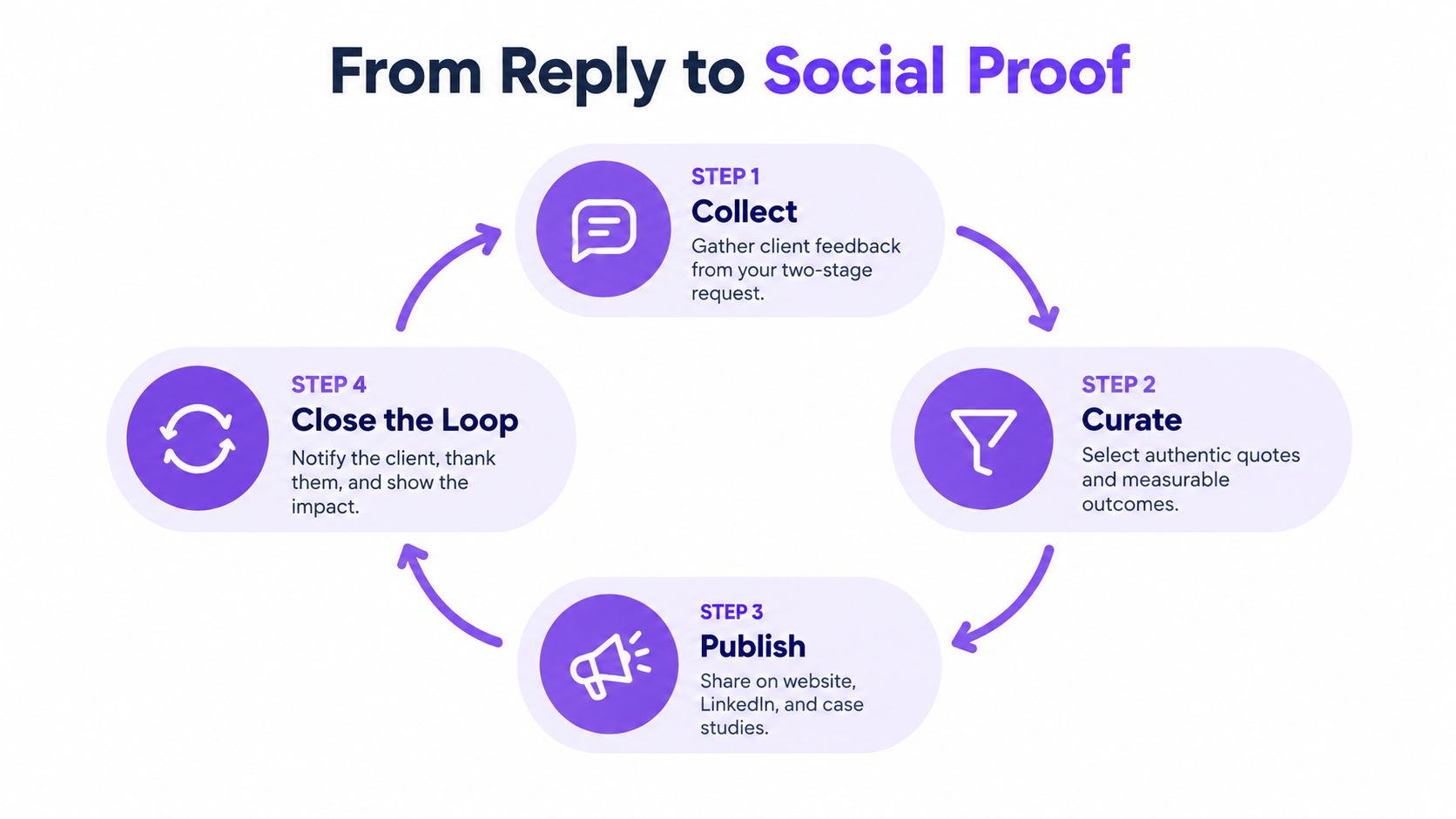
The strongest teams also close the loop with a simple update, “you said, we changed.” That line matters because it tells clients their input wasn't extracted and forgotten. It was used.
The business case is straightforward. People read reviews before they buy, and visible testimonials can materially affect purchase behavior (Pew Research Center on online reviews). If you want more than vanity scores, ask for feedback in a way that reveals who's missing, match the channel to the relationship, and publish the result where buyers look.
Bragly helps you collect first-party testimonials, organize them by use case, and display them with no-code widgets so your feedback system doesn't die in a spreadsheet. If you want to turn client replies into something visible, reusable, and easy to maintain, visit Bragly and see how it fits into your feedback workflow.