Looking for a Shorter Overview?
AI Summary
Key Moments
Proper Entity Relationship
Review markup must link the review or rating explicitly to a specific supported item like a Product or LocalBusiness.Google Eligibility vs Schema Validity
Valid JSON-LD syntax doesn't guarantee rich result display; eligibility depends on content policies and visible page content.Common Policy Violations
Issues like self-served reviews, unanchored averages, and third-party imported reviews lead to markup rejection.Core Vocabulary and Nesting
Understanding how Review, AggregateRating, itemReviewed, and Author nest together clarifies markup meaning and improves debugging.You've added a five-star widget to a product page, pasted a JSON-LD snippet into the <head>, and waited for Google to show stars beside the result. The markup validator reports no obvious syntax problem, yet the search result remains unchanged. That outcome is common because review schema markup isn't a visual widget or a guarantee of stars. It's a structured description of a relationship between a review, a rating, and a specific entity, and Google applies additional eligibility and content policies before it can use that description in search.
This guide treats the implementation as a specification. You'll see how Review, AggregateRating, itemReviewed, and Author fit together, how an individual review differs from an aggregate score, which host types Google documents for review snippets, and how to troubleshoot markup that validates but still isn't eligible.
What Review Schema Markup Actually Does
The most common mistake is assuming that any page can add a rating and receive stars. Review schema markup must describe a specific supported item, such as a product, book, recipe, software application, or local business. The rating doesn't stand alone, because Google needs to understand what the rating refers to.

Schema.org defines Review as a review of an item, while AggregateRating represents a summary of ratings for that item. In both cases, the reviewed target matters. A generic “our company is rated highly” block doesn't provide the same entity relationship as a Product containing an AggregateRating or a Review whose itemReviewed points to that product. Schema.org's definition of Review makes this relationship explicit.
The processing path
A typical implementation follows a chain:
- Your page contains a JSON-LD script using the schema.org vocabulary.
- Google parses the JSON-LD and identifies the entities and properties.
- Google checks whether the reviewed entity belongs to a supported review-snippet type.
- Google compares the markup with the visible page content.
- Google applies its search feature policies and decides whether a rich result may appear.
That last decision is separate from syntax validation. A document can be structurally understandable and still fail Google's rich-result requirements. Google's structured data search gallery describes review snippets as short excerpts or ratings, often based on combined reviewer scores, and lists only selected content types.
Practical rule: Valid structured data tells Google what your data means. Eligibility determines whether Google can use it as a search feature.
The distinction matters for developers building reusable templates. A JSON-LD generator can produce valid properties, but it can't make an unsupported entity eligible or turn hidden review data into visible page content. If you're designing structured data for broader machine understanding, Sight AI's guide to optimize structured data for AI offers useful context, but review markup still needs to follow Google's specific review policies.
Core Vocabulary You Need Before Writing JSON-LD
Before writing code, identify the entities. Review schema markup becomes much easier to debug when each object has one clear responsibility.
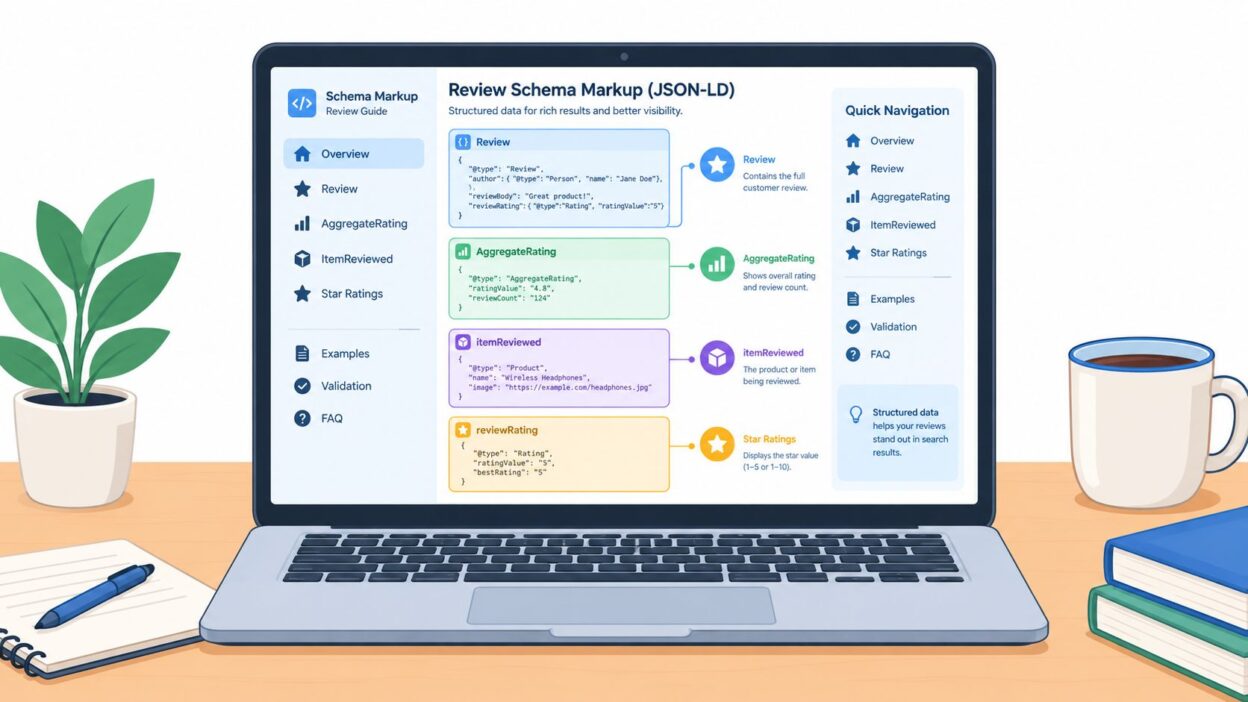
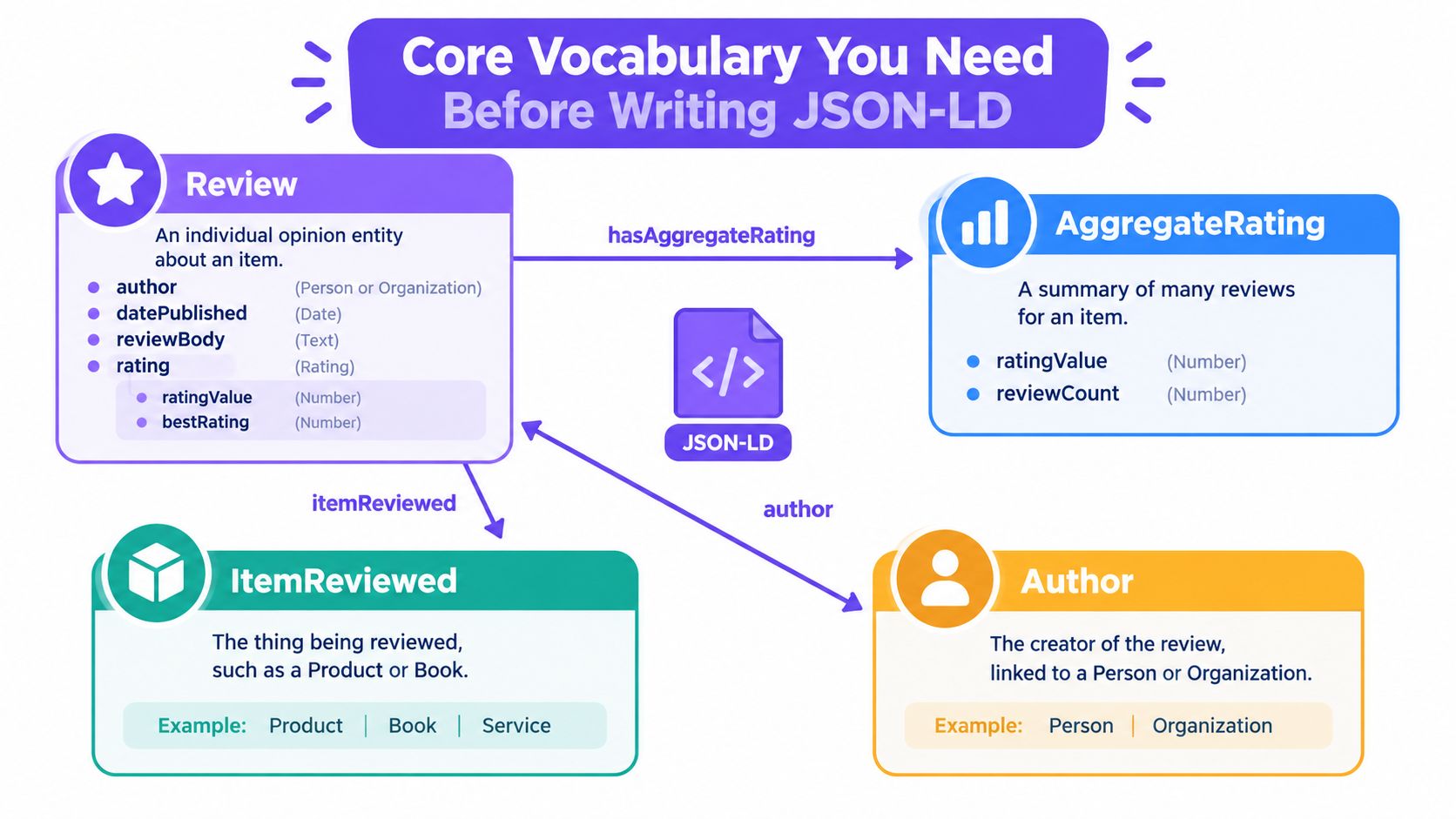
Reviewrepresents one reviewer's opinion. It can includeauthor,datePublished,reviewBody, and a nestedreviewRating.AggregateRatingsummarizes multiple ratings. Its key properties includeratingValue,reviewCount, and the scale boundaries such asbestRatingandworstRating.itemReviewedidentifies the thing receiving the score. It should be a typed schema.org node, such asProduct,LocalBusiness,Recipe,Book,Movie, orSoftwareApplication.Authoridentifies who created the review. The value can be aPersonor anOrganization, depending on the actual publisher.
The parent-child relationship is the part developers often miss. A Product can contain an aggregateRating property, which makes the summary part of the product entity. A Review can contain an itemReviewed property, which points from the opinion to the reviewed product. Both structures identify a target, but they describe different things.
Why nesting changes the meaning
Consider these two patterns:
- A
ProductwithaggregateRatingsays the product has a combined rating summary. - A
ReviewwithitemReviewedsays a particular author reviewed that product. - A standalone
AggregateRatingwithout a reviewed item leaves Google without a clear target. - A loose
Reviewbeside an unrelatedProductcreates ambiguity unless the relationship is explicit.
The rating scale also needs to be coherent. ratingValue is the score, while bestRating and worstRating define the scale represented by that score. The visible page should use the same interpretation. A developer shouldn't mark a five-point rating system in JSON-LD while displaying a different scale to users.
For a practical look at how rating systems are structured before they reach markup, see rating options for scalable review collection. The important implementation habit is simple: define the reviewed item first, then attach the individual or aggregate rating to that item.
Anatomy of a Valid Review Snippet
A minimal individual review needs more than a score. Google's review-snippet documentation expects the review to identify its target, rating, author, and publication or modification timing. The visible review content also needs to exist on the same page, rather than appearing only inside JSON-LD.
Here's a compact example for a product review:
{
  "@context": "https://schema.org",
  "@type": "Review",
  "itemReviewed": {
    "@type": "Product",
    "name": "Example Noise-Cancelling Headphones",
    "url": "https://www.example.com/products/headphones"
  },
  "reviewRating": {
    "@type": "Rating",
    "ratingValue": "4",
    "bestRating": "5",
    "worstRating": "1"
  },
  "author": {
    "@type": "Person",
    "name": "Jordan Lee"
  },
  "datePublished": "2026-08-20",
  "reviewBody": "The headphones are comfortable and effective in a busy office."
}
Reading the object field by field
@contexttells parsers to interpret the vocabulary as schema.org.@typeidentifies the top-level entity as aReview.itemReviewedconnects the opinion to a typedProduct.reviewRatingcontains aRatingobject and itsratingValue.authoridentifies the reviewer.datePublishedsupplies the review's publication date.reviewBodymirrors the text users can read on the page.
Google's documentation specifically requires the reviewed item, rating, author, and a publication or modification date for a review snippet implementation. reviewBody helps represent the visible content accurately, while properties such as name, publisher, and url can make the entity easier to interpret.
A schema.org validator may accept a broader structure than Google's review rich-result feature. That's why developers should distinguish between schema validity and Google eligibility. The Bragly star rating schema generator can help produce an initial JSON-LD structure, but you still need to confirm that the values match the rendered page and Google's policies.
The following video provides another visual walkthrough of the code structure:
Don't treat a green test result as permission to hide the review text. If users can't find the author, score, reviewed item, or review content on the page, Google can disregard the markup even when the JSON-LD parses correctly.
Aggregated vs Individual Reviews Compared
An individual review and an aggregate rating answer different questions. An individual review answers, “What did this reviewer say?” An aggregate rating answers, “What combined score does this item receive from the reviews represented here?”
The structure should reflect that difference.
Individual review on a product
{
  "@context": "https://schema.org",
  "@type": "Product",
  "name": "Example Noise-Cancelling Headphones",
  "review": {
    "@type": "Review",
    "author": {
      "@type": "Person",
      "name": "Jordan Lee"
    },
    "datePublished": "2026-08-20",
    "reviewBody": "The headphones are comfortable and effective in a busy office.",
    "reviewRating": {
      "@type": "Rating",
      "ratingValue": "4",
      "bestRating": "5",
      "worstRating": "1"
    }
  }
}
This model exposes the reviewer, date, written opinion, and score. The review is nested inside the product, so the relationship is unambiguous.
Aggregate rating on a local business
{
  "@context": "https://schema.org",
  "@type": "LocalBusiness",
  "name": "Example Coffee House",
  "url": "https://www.example.com/locations/coffee-house",
  "aggregateRating": {
    "@type": "AggregateRating",
    "ratingValue": "4.6",
    "reviewCount": "48",
    "bestRating": "5",
    "worstRating": "1"
  }
}
This model exposes the combined score and the number of reviews represented. It doesn't provide individual quotes, reviewer names, or publication dates. Those properties belong to individual Review entities, not to the aggregate summary.
| Aspect | AggregateRating | Individual Review |
|---|---|---|
| What it describes | A combined rating summary | One reviewer's opinion |
| Main entity | AggregateRating |
Review |
| Typical properties | ratingValue, reviewCount, bestRating |
author, datePublished, reviewBody, reviewRating |
| Reviewed target | One specific item | One specific item |
| Written text | Not required for the summary | Should match visible review content |
| Search presentation | Can support aggregate star information when eligible | Can represent an individual review snippet |
Google's review documentation requires Review or AggregateRating to attach to a specific item, not to a category or list of items. A page with several loose Review objects but no clear parent relationship leaves the implementation difficult to interpret. Individual reviews alone don't represent the combined calculation that an aggregate rating is meant to describe.
Implementation test: If you can't point to one product, business, book, recipe, or other typed item for the rating, the markup is missing its central relationship.
Use AggregateRating only when the summary reflects the reviews represented on the page. Don't create an average that users can't verify, and don't attach a sitewide score to every entity because the same number appears in a header or footer.
Eligible Item Types and Google's Content Policy
Google doesn't treat every schema.org type as eligible for review rich results. Its documentation identifies supported review-snippet hosts including Book, Course, Event, Game, LocalBusiness, Movie, MusicPlaylist, MusicRecording, Organization, Product, Recipe, SoftwareApplication, and certain CreativeWork subtypes. The review snippet documentation is the authority to check before implementation.
The reviewed item belongs in the JSON-LD tree as the host entity. For a product page, that's usually Product. For a restaurant or shop, use the most accurate LocalBusiness subtype available. For a recipe, use Recipe, and for software, use SoftwareApplication. The review or aggregate rating should be nested in that entity or connected through itemReviewed.
Visible content is part of the implementation
Google requires reviews and ratings marked up on a page to be readily available to users on that same page. A score hidden exclusively in the JSON-LD doesn't satisfy the practical requirement. The page should visibly identify the reviewed item and present the rating or review in a way users can access.
Google also says sites must not aggregate reviews from other websites for markup purposes. Importing a rating from a third-party platform and placing it in JSON-LD doesn't become compliant because the number is genuine. The markup needs to represent review content available on the page and follow the applicable ownership and publisher rules.
Critic reviews have narrower conditions. CriticReview is intended for editorial review contexts, not as a general-purpose wrapper for a business's own marketing opinion. A validator may parse the type while Google still declines the rich result because the page, publisher, or content doesn't fit the policy.
Policy check: Ask whether the page visibly contains the review, whether the reviewed item is explicit, and whether the host type is supported before you spend time fixing optional properties.
Validating Review Schema Before You Ship
Validation works best as a sequence of different checks, not a single green badge. Each tool answers a different question.
First check the Rich Results Test
Paste the deployed URL or the JSON-LD code into Google's Rich Results Test. Confirm that Google detects the intended review-related item and identify whether the result is eligible, contains warnings, or has errors.
Errors generally require correction before the feature can be considered. Warnings may identify recommended properties that improve completeness, but they don't all carry the same weight. Read each warning in context, then compare the value with the content users can see.

Then check schema.org structure
Use the Schema Markup Validator to confirm that the JSON-LD parses against schema.org. This layer helps catch malformed JSON, unknown properties, incorrect value types, or missing relationships such as itemReviewed. It doesn't replace Google's eligibility test, because schema.org's vocabulary and Google Search's product policies aren't identical.
Finally inspect Search Console
Search Console's Enhancements reports show how Google processes structured data after crawling and indexing. A live test can confirm what the page returns now, but Search Console helps reveal recurring issues across indexed URLs.
A practical checklist looks like this:
- Rendered page: Confirm the review, score, author, and reviewed item are visible.
- Entity relationship: Verify that
RevieworAggregateRatingpoints to one specific typed item. - Eligibility: Check that the host type appears in Google's supported documentation.
- Consistency: Match the displayed rating, scale, count, and text to the JSON-LD.
- Indexing: Review Search Console after Google processes the live page.
For broader storefront checks, a technical SEO checklist for storefront speed can sit alongside structured-data validation. A fast page doesn't make invalid review markup eligible, but technical problems can still interfere with crawling and rendering.
Common Mistakes That Get Markup Rejected
A developer can fix every comma and still fail Google's policy review. The most damaging problems usually concern who supplied the review, what entity receives the rating, and where the underlying reviews came from.
Self-served reviews
A business can display customer feedback on its own site, but it can't present the business's own promotional claims as independent reviews. Google's policy distinguishes between genuine reviewer content and self-serving markup created by the entity being evaluated. Staff-authored praise wrapped in Review is not equivalent to a customer review.
Sitewide averages without a matching item
A homepage may display a general company score, but applying one AggregateRating to an Organization while the visible content refers vaguely to many products, services, or locations creates an entity mismatch. Google requires the rating to attach to a specific item, not a category or list.
Imported third-party reviews
Reviews copied from platforms such as Yelp, Trustpilot, or Amazon create another problem when the page doesn't visibly reproduce the content represented by the markup. Google's documentation says sites must not aggregate reviews from other websites for markup purposes. The fact that a third-party platform supplied the original review doesn't make the markup compliant on your page.
| Violation | Failing Pattern | Fix |
|---|---|---|
| Self-served review | A business marks up its own promotional testimonial as an independent review | Use genuine customer review content and identify the reviewed item accurately |
| Unanchored average | One sitewide score is attached to an entity that doesn't represent the specific reviewed item | Attach AggregateRating to the actual product, business, book, or other supported item |
| Third-party aggregation | Imported ratings appear in JSON-LD without the represented reviews being visible on the same page | Mark up only content that users can access on the page and that complies with Google's policy |
If Rich Results Test returns “Eligible: Not detected,” check these policy patterns before rewriting valid JSON syntax. A tool can identify parse failures, but it can't turn unsupported or misleading content into eligible review markup.
For teams assessing the trustworthiness of incoming feedback before publishing it, a fake review checker can be part of the editorial review process. It doesn't replace Google's structured-data policies, and it shouldn't be treated as proof that a page qualifies for stars.
Why the 2019 Update Changed Everything
In September 2019, Google changed how review rich results work and said it would display reviews only for specific schema.org types, including Book, Course, Event, LocalBusiness, Product, Recipe, and SoftwareApplication. The September 2019 Google Search Central announcement marked a major shift from broad star-rating tactics to a controlled feature tied to supported entities and search policies.
Before that change, developers often treated review markup as a general enhancement that could be added to almost any page. The narrower rules changed the implementation question. Instead of asking, “Where can I place a star rating?” developers needed to ask, “What specific supported item is being reviewed, and does this page meet Google's requirements?”
That historical change explains why older tutorials can mislead. A snippet that once appeared to work for a generic business or content page may now parse without producing a review rich result. Modern implementations need an authoritative reviewed entity, visible review content, and a rating that accurately represents the page.
The practical consequence: Review schema markup is no longer a broad presentation shortcut. It's a structured relationship governed by item type, page content, and policy.
The update also made itemReviewed and host-item nesting more important in day-to-day development. A rating has meaning only when Google can connect it to the exact thing receiving the rating.
Quick Reference for Required and Recommended Fields
Use this table as a desk reference while editing JSON-LD. Requirements can differ between general schema.org validity and Google's review rich-result eligibility, so validate against both vocabularies and Search Central documentation.
| Field | Parent Type | Required | Type |
|---|---|---|---|
@context |
Any JSON-LD entity | Yes | URL |
@type |
Any JSON-LD entity | Yes | Text |
itemReviewed |
Review |
Yes | Typed schema.org item |
reviewRating |
Review |
Yes | Rating |
ratingValue |
Rating or AggregateRating |
Yes | Number or text value |
bestRating |
Rating |
Recommended or required for Google review use | Number or text value |
worstRating |
Rating |
Recommended | Number or text value |
ratingValue |
AggregateRating |
Yes | Number or text value |
reviewCount |
AggregateRating |
Yes | Number |
ratingCount |
AggregateRating |
Recommended when applicable | Number |
author |
Review |
Yes | Person or Organization |
datePublished |
Review |
Yes, unless an accepted modification date is supplied | Date |
name |
Review |
Recommended | Text |
reviewBody |
Review |
Recommended | Text |
publisher |
Review |
Recommended | Person or Organization |
url |
Review or host item |
Recommended | URL |
Keep ReviewRating separate conceptually from AggregateRating. An individual review uses a Rating object to express one score, while an aggregate uses ratingValue and reviewCount to summarize a set of ratings. The field names overlap, but their parent entities don't.
Where Bragly Fits in a Schema-Friendly Workflow
Review schema markup only describes review content that your page publishes and can show to users. That creates a practical gap for sites that want to collect first-party feedback without copying ratings from external platforms.
Bragly offers embeddable review and testimonial widgets, review collection forms, automatic synchronization for connected sources, and structured-data output alongside rendered review content. A team still needs to check the page's item type, visible content, entity relationships, and Google eligibility, but keeping the structured data aligned with the displayed widget reduces the risk of stale or mismatched values.
Bragly helps you collect and display review content directly on your website, then connect visible ratings to accurate structured data for supported entities. Visit Bragly to explore its review widgets and collection workflow before adding review schema markup to your site.