

Looking for a Shorter Overview?
AI Summary
Key Moments
The Three Core Jobs of Feedback Management
Collecting, organizing, and presenting feedback ensures it impacts decisions and operations.Centralized vs. Dispersed Feedback
Centralized systems make spotting issues faster and maintain accuracy across platforms.Key KPIs to Track
Monitoring review volume, response rate, and theme share connects feedback to actions.Effective Feedback Response
Timely, specific replies with clear ownership improve customer trust and show care.Customer feedback management is how you collect, organize, and actually use what customers tell you. Without it, reviews, survey answers, and testimonials pile up in different places and never help anyone make a decision.
What Customer Feedback Management Really Means

Think of feedback like receipts stuffed in a kitchen drawer. The information is there, but good luck finding the one you need when it matters.


Customer feedback management is the habit of pulling those receipts out, sorting them, and putting the useful ones where buyers, marketers, and product teams can actually see them.
The Three Jobs That Make Feedback Useful
No program works unless feedback moves through the full chain. Miss one step and the whole thing stalls.
- Collect feedback from reviews, surveys, and your own forms, so everything comes in through one consistent process.
- Organize feedback by source, theme, rating, and date, so patterns start to stand out instead of blending together.
- Present feedback where people are deciding, while keeping older testimonials accurate and up to date.
Customer feedback management turns opinions into organized action, not just stored data.
Here is a quick way to look at how the three fit together:
The Three Core Jobs of Customer Feedback Management
| Core Job | What It Involves | Why It Matters |
|---|---|---|
| Collecting feedback | Gather reviews, survey responses, and testimonials. | Gives every team a consistent source of customer opinions. |
| Organizing feedback | Tag feedback by theme, source, rating, and date. | Makes recurring issues easier to spot and act on. |
| Presenting feedback | Publish relevant proof in the right customer-facing location. | Keeps social proof current and useful at decision points. |
When all three are running, nothing important slips through the cracks.
Why This System Matters Across Business Types
The jobs are the same everywhere. What changes is where that proof shows up.
A service business needs fresh proof on service pages. An online store needs product-specific reviews right next to the buy button. A SaaS team needs feedback that explains onboarding and support, not just star ratings.
- Small business: Good reviews answer common buying questions and reassure local customers.
- E-commerce brand: Organized feedback helps shoppers compare and cuts down on repeat support questions.
- SaaS team: Tagged feedback shows where onboarding, usage, or support needs work.
Build a Simple Mental Model
Think librarian, not storage box.
Start by listing every place customers can leave feedback. Then set up one simple way to collect it, organize it, and publish it.
Picture a shop owner checking five review sites every Monday morning, coffee in hand, thinking she's covered.
She misses the same complaint about delayed orders popping up on the one site she skimmed. Each tab looks fine by itself, but the pattern never comes together.
Centralized Versus Dispersed Feedback Approaches
With a dispersed approach, feedback just lives where customers left it. You hop from platform to platform and check each one by hand.
With a centralized approach, those sources feed into one place. Your team gets a single spot to read through what customers are actually saying.
That split matters because customers don't all check the same place. BrightLocal's 2025 Local Consumer Review Survey of 1,026 U.S. adults found 40% use at least two review sites, while 27% stick to just one — and 48% still turn to local news outlets for reviews of local businesses.
Centralize your view, not your assumptions. A shared dashboard only helps if you know what's connected and what still needs a manual look.
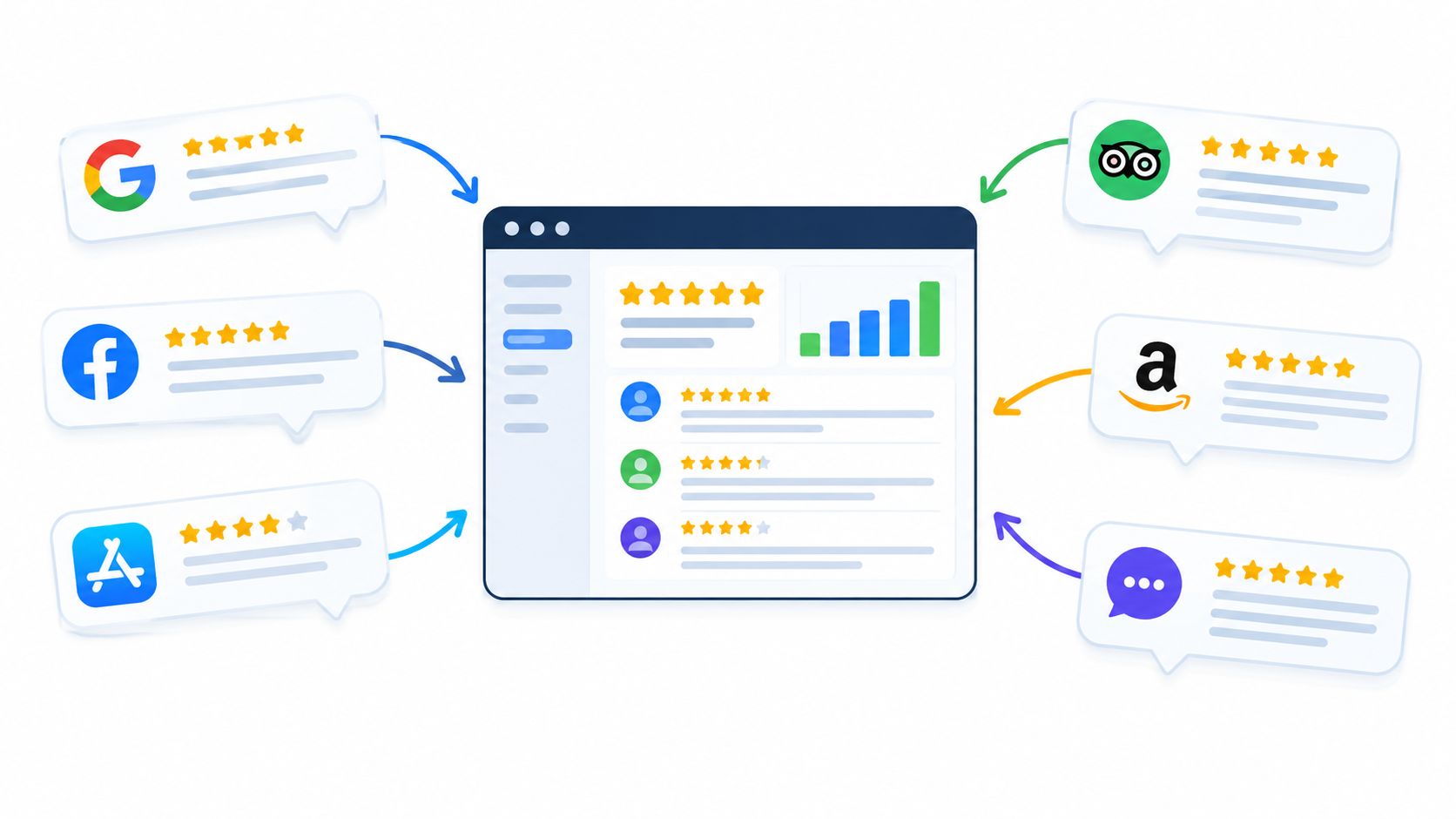
Dispersed Versus Centralized Feedback Management
It's not really about which setup looks tidier. It's about which one helps you spot the important stuff faster and keeps your testimonials from going stale.
Here's how the day-to-day work compares:
| Factor | Dispersed Approach | Centralized Approach |
|---|---|---|
| Maintenance effort | Check each source on its own and copy updates over by hand. | Look over connected sources together, after the initial setup. |
| Website consistency | Fix each testimonial spot separately. | Handle shared displays from one system. |
| Recurring themes | Piece things together across tabs and notes. | Read collected comments side by side to catch repeats. |
| Outdated testimonials | Track dates separately for every placement. | Use syncing where it's available, with quick accuracy checks. |
A central system doesn't mean full coverage, though. Or that problems fix themselves. Always check which sources are supported, how often things refresh, and whether your website displays really update.
- For the shop owner, seeing those delivery complaints in one place makes it much easier to spot a real issue early.
- For an online store, managing displays centrally cuts down on editing the same testimonial across product pages.
Choose the Lightest Reliable Setup
Sometimes the simple setup is plenty. If feedback trickles in slowly, you only watch a few sources, and one person keeps a tracking sheet up to date, there's no need to add software.
Centralization starts to make sense when checks get skipped. Or when three people are editing testimonials. Or when you suspect a pattern but can't quite prove it.
- List every feedback source, including the ones you still have to check manually.
- Pinpoint where complaints or updates are slipping through.
- Test whether a shared system actually closes those specific gaps.
Audit your current setup this week. Pick one missed complaint or stale testimonial, trace back how it happened, and let that tell you what to fix first.
Judge customer feedback management by what actually improves. Not by how full the dashboard looks.
Key Benefits and KPIs Worth Tracking
You're looking for three practical wins. Better first impressions from fresh testimonials, less time spent keeping them updated, and a clearer view of what people praise and complain about.
Treat those as things to prove. They don't happen automatically.
A plumber, for example, might watch whether testimonials lead to more booking requests. An online shop would watch purchases instead. Both should also log monthly maintenance time to see if their workflow is actually saving effort.
A useful KPI connects customer opinions to a decision, an action, or a business outcome.
Start with the basics below. All the examples are hypothetical, and the check-in frequencies are just starting points.
- Review volume is how many new reviews come in. Check weekly: a plumber might get eight new reviews, a shop might get thirty. Always compare that against completed jobs or orders before you call it growth.
- Average rating over time is how your score moves. Check monthly: a plumber could compare this month to last month, a shop could compare product categories. Never look at the average without the review count next to it.
Track Responsiveness and Recurring Themes
Next, check whether reviews get a reply and whether patterns start to show. Think of these as warning lights. They tell you where to look, not exactly what to fix.
| KPI | Meaning | Hypothetical Examples | Check |
|---|---|---|---|
| Response rate | Percentage of new reviews answered | Plumber answers nine of ten; shop answers eighteen of twenty | Weekly |
| Time to respond | Elapsed time before the first reply | Plumber replies within a day; shop spots weekend delays | Weekly |
| Theme share | Percentage mentioning a defined topic | Plumber tracks punctuality; shop tracks delivery complaints | Monthly |
For theme share, divide reviews that mention a topic by all reviews in that same period. Split positive and negative mentions, so praise for delivery doesn't cover up complaints about delays.
Connect Testimonial Pages to Buyer Actions
Finally, track conversion rate on pages that show testimonials. That's completed actions divided by visits, measured the same way every time.
- Choose the action. A plumber counts booking requests, an online shop counts purchases.
- Compare monthly. Keep traffic sources, offers, and seasonality in mind. A shift alone doesn't prove testimonials caused it.
Don't chase raw totals and ignore relevance, detail, or recency. Pick two KPIs this week, write down your baseline, and have someone review the numbers next month.
Good customer feedback management comes down to two things: how you ask, and how you reply.
Collecting and Responding to Feedback Well
Timing matters more than most people think. Ask while the experience is still fresh, but wait until the customer has something real to judge.
For a shop, that usually means after delivery, not right after payment. For a consultant, it's after a finished milestone. Don't wait until the whole project wraps if a client can already point to a specific result.
- Keep requests neutral. Ask what worked and what could be better, without pushing for praise.
- Make participation simple. A short form with a few focused questions will beat a long survey every time.
- Offer complementary channels. Use your own feedback form first, then add an optional public review ask. Never make going public conditional on a happy answer.
Try pairing "What almost stopped you from ordering?" with "How did the product meet your expectations?" And browse these customer feedback questions to ask when you're shaping your next request.
Respond with Care and Clear Ownership
Think of review replies like answering the phone at a front desk. The person in front of you needs to feel heard, and everyone else in line is listening too.
Acknowledge the experience, explain the next step, and follow through.
For praise, get specific. "Thanks for highlighting Maya's clear installation walkthrough" feels far more genuine than the same thank-you copied under every review.
Complaints take a bit more work. Name the actual problem without getting defensive, check what happened, then offer a clear next step.
| Feedback | Suggested Response |
|---|---|
| Helpful onboarding | Thank the customer and recognize the team involved. |
| Missing delivery | Acknowledge the concern and offer private support. |
| Billing dispute | Move account details into a private conversation. |
Something like, "I'm sorry your parcel hasn't arrived. Please contact our support team privately so we can check the shipment" protects personal details and avoids promising a refund you can't confirm yet.
Assign one person to watch incoming feedback between weekly reviews. Set a realistic response target, and acknowledge tough cases right away even if the fix takes longer.
Keep a Thirty Minute Weekly Routine
Use this suggested thirty minute routine as a baseline, not an excuse to leave urgent complaints sitting.
- Ten minutes collecting. Check new forms and public reviews, then send the follow-up invites you owe.
- Ten minutes responding. Personalize your thank-yous, acknowledge complaints, and hand off open issues to a named owner.
- Ten minutes checking progress. Review promises you've made, confirm what's fixed, and update the customers who were waiting.
Block thirty minutes on your calendar this week, pick a backup responder, and draft one neutral request you can send after your next delivery or milestone.
Good customer feedback management isn't just about gathering comments. It's about connecting what past customers said to the questions new buyers need answered before they commit.
Analyzing Feedback and Choosing What to Display

Think of your review collection like a shop window, not a trophy cabinet. You want feedback that explains the experience, not just a wall of praise.
A simple way to start is with theme tags for pricing, support, quality, and ease of use. Keep sentiment separate from the topic, because "support" could mean a great agent or a ticket that went nowhere.
- Pricing: Look for mentions of value, surprise costs, or affordability.
- Support: Separate how fast the reply was from whether the issue got fixed.
- Quality: Pull out specifics on reliability, materials, or actual results.
- Ease of use: Flag notes about setup, learning curve, and day-to-day use.
A software buyer is a good example. They might love how easy setup was but push back on price. Tag it for both instead of forcing it into one bucket.
Choose reviews that answer a buyer's question, not just reviews that flatter your business.
Match Review Themes to Buyer Questions
Once everything is tagged, filter by what that page is supposed to do. Each testimonial should sit next to the doubt it's meant to resolve.
| Page | Buyer Question | Relevant Theme |
|---|---|---|
| Pricing | Is this worth the cost? | Value |
| Product | Will it last? | Quality |
| Signup | Can I get started easily? | Ease of use |
Price changes the math here. Research from Northwestern University's Spiegel Research Center found displaying reviews lifted conversion by 190% for lower-priced products and 380% for higher-priced products, with most of the lift coming from the first five reviews. Purchase intent also peaked between 4.0 and 4.7 stars. Explore the findings on reviews and sales.
That's a good argument for picking detailed, mixed feedback over chasing a perfect 5.0 score. It doesn't promise you'll see the same lift, and it's not a reason to hide the rest of your reviews.
Leave relevant criticism up, and don't strip excerpts of their context. What feels like a dealbreaker to one buyer won't matter to the next.
Check AI Findings Against Original Reviews
AI summaries and highlights are useful for spotting repeat themes fast. Bragly includes those analysis features alongside tagging, so you can treat the suggestions as a shortlist.
- Inspect the originals. Make sure the summary actually matches what the customer meant.
- Review mixed sentiment. Don't let the positive part bury a specific complaint.
- Confirm relevance. Filter out old comments about features or policies you've changed.
For a deeper breakdown of what those signals mean, read Bragly's guide to review sentiment analysis.
Pick one high-traffic page today, name the biggest question buyers have on it, and choose testimonials that answer it straight.
Picture a SaaS team with reviews scattered across a few platforms, a couple of good testimonials sitting in a form inbox, and a website thrown together with a no-code builder. Nothing is broken. There's just no repeatable way to tie it all together.
Building a Feedback Workflow That Fits Your Business

Think of your customer feedback management workflow like a relay race. Every handoff needs a clear next step and one person who actually owns it.
Don't try to connect everything on day one. Start with a small plan your team can stick to.
- Audit your sources. List your public review profiles, collection forms, and any testimonials you've saved by hand. Note who can access each one.
- Pick two or three monthly KPIs. For this team, response rate, maintenance time, and homepage signup conversion are enough to start.
- Name a weekly review owner. Pick a backup, too. And keep urgent complaints out of that weekly pile.
- Pick one high-traffic page. Test one testimonial layout there before you touch the rest of the site.
Build a routine your team can maintain before adding more sources, pages, or reports.
Connect Sources Without Losing Ownership
Once those jobs are assigned, pick software that supports the handoffs. Bragly pulls in reviews from more than 50 sources, syncs connected sources automatically, and runs first-party collection forms right next to imported reviews.
For that SaaS team, that means public reviews and form submissions finally live in the same place. Tag things like onboarding, support, and reporting. Then filter testimonials for the pages where those topics actually matter.
- Marketing owns presentation. Someone checks that the quotes you show still match current features and messaging.
- Support owns follow-through. Complaints go to a named person who follows up and closes the loop.
- The site owner owns publishing. After you embed, check how it looks on mobile and desktop.
Automatic sync cuts down on manual copy-paste. It doesn't replace those owners, though. Keep a short checklist for sources that don't sync, and double-check that connected reviews are showing up correctly.
If you want ideas for turning feedback into fixes, look through these customer experience examples. Pick one change your team can assign, finish, and tell customers about.
Match Displays and Plans to Your Needs
Next, pick the display based on what the page is for. Not the widget with the most motion. Bragly has no-code embeds for Webflow, WordPress, Wix, and custom sites, so the team can test a placement without rebuilding anything.
| Page | Suggested Layout | What to Check |
|---|---|---|
| Homepage | Carousel | Visitors can read each quote comfortably. |
| Product page | Grid | Reviews address relevant features and outcomes. |
| Checkout area | Badge | Reassurance doesn't obstruct payment controls. |
Keep that first test dead simple. Note the page's baseline conversion rate, publish the widget, then compare. Just account for traffic swings or promos.
Budget counts, too. Bragly lists a free starter tier, Pro at $14/month with a trial, and Business at $67/month. Confirm current pricing and limits before you sign up.
Pro allows up to 20 collection forms, Business allows up to 100. Check source, widget, and monthly AI analysis limits against your real workload instead of picking on price alone.
Start this week with one connected source, one page, and one accountable owner. Check your KPIs next month, fix what slipped, and expand only while the routine still feels manageable.
Once you start running customer feedback management day to day, the same practical questions come up.
Frequently Asked Questions About Customer Feedback Management
What Size Business Needs a Formal Feedback System?
Forget headcount and use need as the trigger. If reviews are scattered across platforms, or your site leans on testimonials to sell, you need one shared record. Even low volume gets messy fast without it.
Start small with the basics:
- Source tracking so you always know where a review came from.
- Clear ownership so someone owns replies and accuracy checks.
- Review dates so old testimonials don't sit there unnoticed.
How Many Reviews Are Enough to Influence Buyers?
There is no magic number. Northwestern's findings on reviews and sales show the biggest lift comes from the first five reviews, then returns drop off quickly.
Take that as a starting line, not a finish line. Five specific comments about the exact product a shopper is viewing beat a pile of vague praise.
Prioritize relevant evidence over a bigger review counter.
How Should You Handle Negative Feedback Without Hurting Your Brand?
Reply fast, name the specific issue, and stick to what you can verify. Never argue in public or post personal details.
A late delivery needs a shipment check, for example. Not a defensive note about how busy you've been.
- Acknowledge the problem and move it to a private support channel.
- Assign one person to dig in and follow through.
- Log repeat complaints as signals for product or service fixes.
Can First-Party and Third-Party Reviews Appear Together?
Yes, just label each source clearly. Keep dates accurate and keep any imported reviews current. Show what customers submitted directly for what it is, without implying outside verification.
Start with Bragly by connecting one review source, asking for direct feedback, and publishing a clearly labeled display. Explore Bragly and pick one page to improve this week.