Looking for a Shorter Overview?
AI Summary
Key Moments
Scaling Framework for Agencies
A 4-stage scaling framework helps agencies manage increasing clients from manual processes to advanced automation.Defined Team Roles
Clear roles like Review Lead, Response Specialist, Analytics, and Client Success prevent chaos and improve quality.Effective Automation Practices
Automate 5-star review responses and alerts, but handle negative reviews manually to maintain trust.Client Reporting Metrics
Focus reports on review volume, average rating, response rate, and sentiment rather than overwhelming clients with excessive data.Managing reviews for 5 clients feels manual. Managing reviews for 50 clients feels impossible—unless you have a system. This guide walks you through the exact workflow framework agencies use to scale from chaos to control, including team structure, automation rules, and the tools that actually work.
Key Takeaways
- Most agencies break at 20-30 clients because they lack a centralized system for managing reviews across multiple platforms
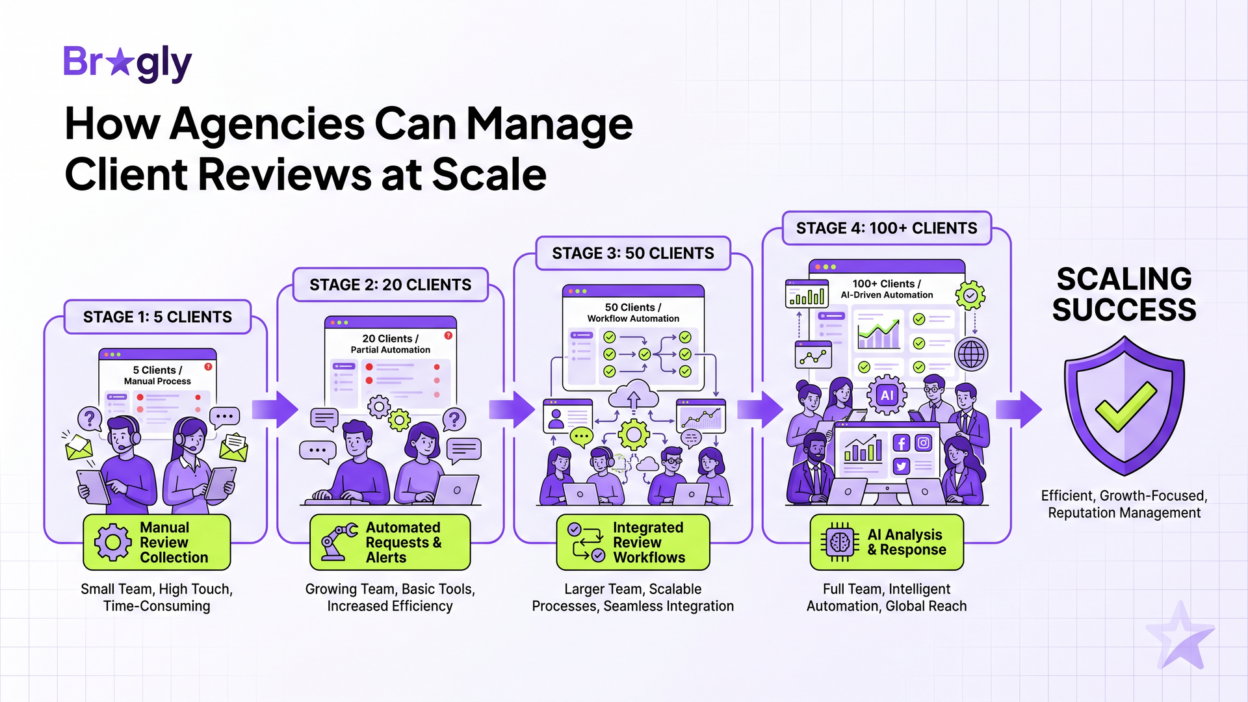
- The solution is a 4-stage scaling framework: Manual (5 clients) → Workflow (20 clients) → Distributed Team (50 clients) → Fully Automated (100+ clients)
- Automation should handle 5-star reviews and alerts, but negative reviews always need manual responses
- Clear team roles (Review Lead, Response Specialist, Analytics, Client Success) prevent chaos and burnout
- Real-time dashboards and monthly narratives are what clients actually care about—not 50-page PDFs
Why Agencies Struggle With Reviews at Scale
You start with 5 clients. Each one gets reviews on Google, maybe Yelp. You’re checking each platform manually, responding to reviews, forwarding screenshots to clients. It’s annoying but manageable.
Then you land 10 more clients. Now you’re juggling Google, Yelp, Trustpilot, Facebook, and Capterra. You’re logging into 5 different platforms for each client. Your team is spending 3-4 hours a day just monitoring reviews. Nobody’s actually responding to them.
By the time you hit 30 clients, something breaks. Either reviews go unanswered for days, or your team is drowning in busywork. You realize you need a system, not just a process.
Here’s the core problem: review management tools were built for single businesses, not agencies. One dashboard. One team. One client. They don’t account for the reality of juggling dozens of accounts across multiple platforms at the same time.
The Multi-Platform Challenge: Why One Dashboard Isn’t Enough
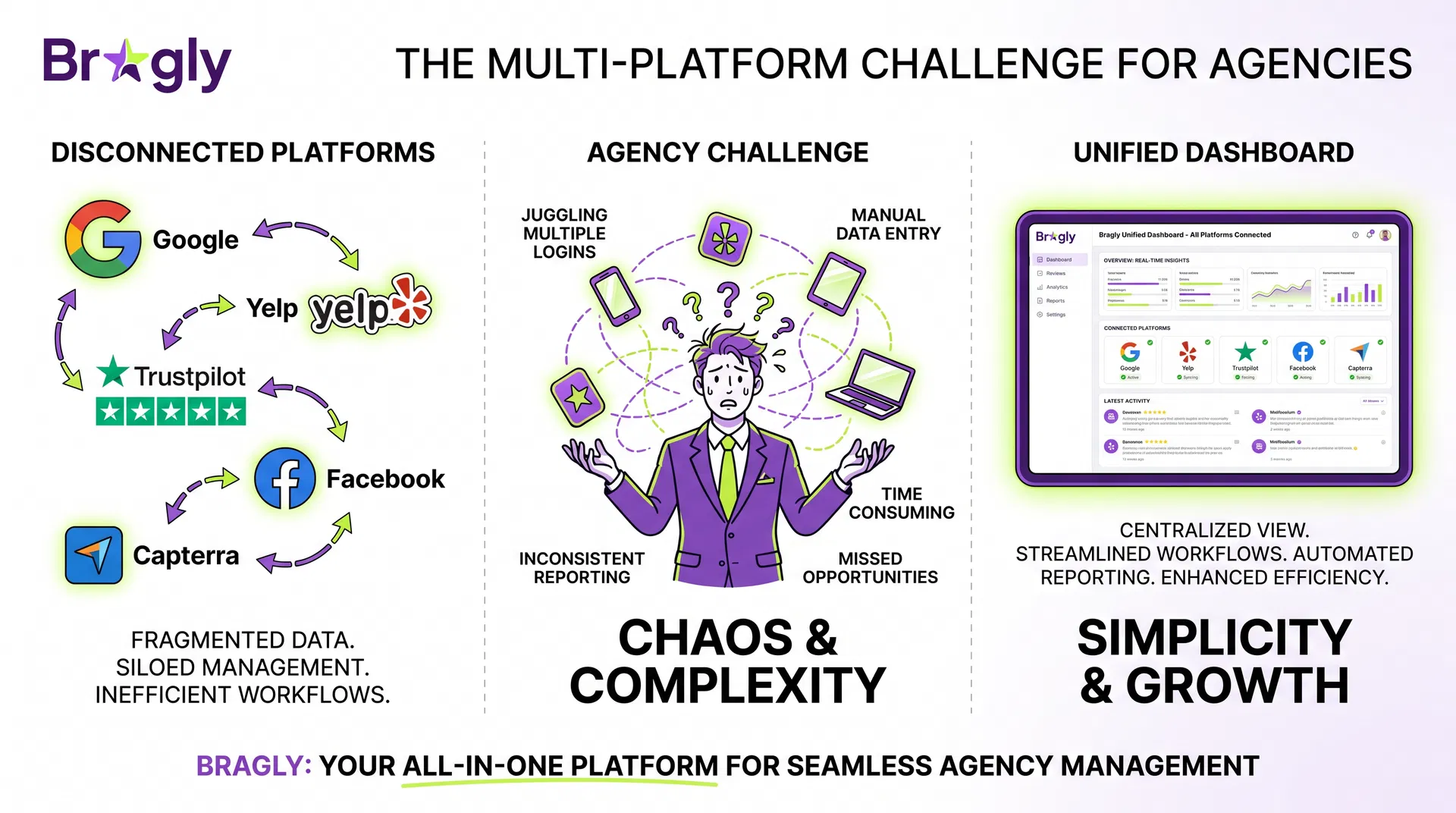
Here’s what kills most agencies: your clients don’t all use the same review platforms.
A local plumbing client gets reviews on Google and Yelp. A SaaS client gets reviews on G2, Capterra, and Trustpilot. An e-commerce client gets reviews on Amazon, Shopify, and their own website. A restaurant gets reviews on Google, Yelp, TripAdvisor, and Facebook.
If you’re managing each platform separately, you’re running 5-10 different jobs at once. Google for Client A. Yelp for Client B. Trustpilot for Client C. By the time you circle back to Client A, 2 days have passed and 3 reviews are sitting there unanswered.
The solution isn’t hiring more people. It’s aggregation. Pull everything into one place. A centralized dashboard pulls from all platforms. One place to manage them all.
The Agency Review Workflow Framework: From 5 Clients to 100+
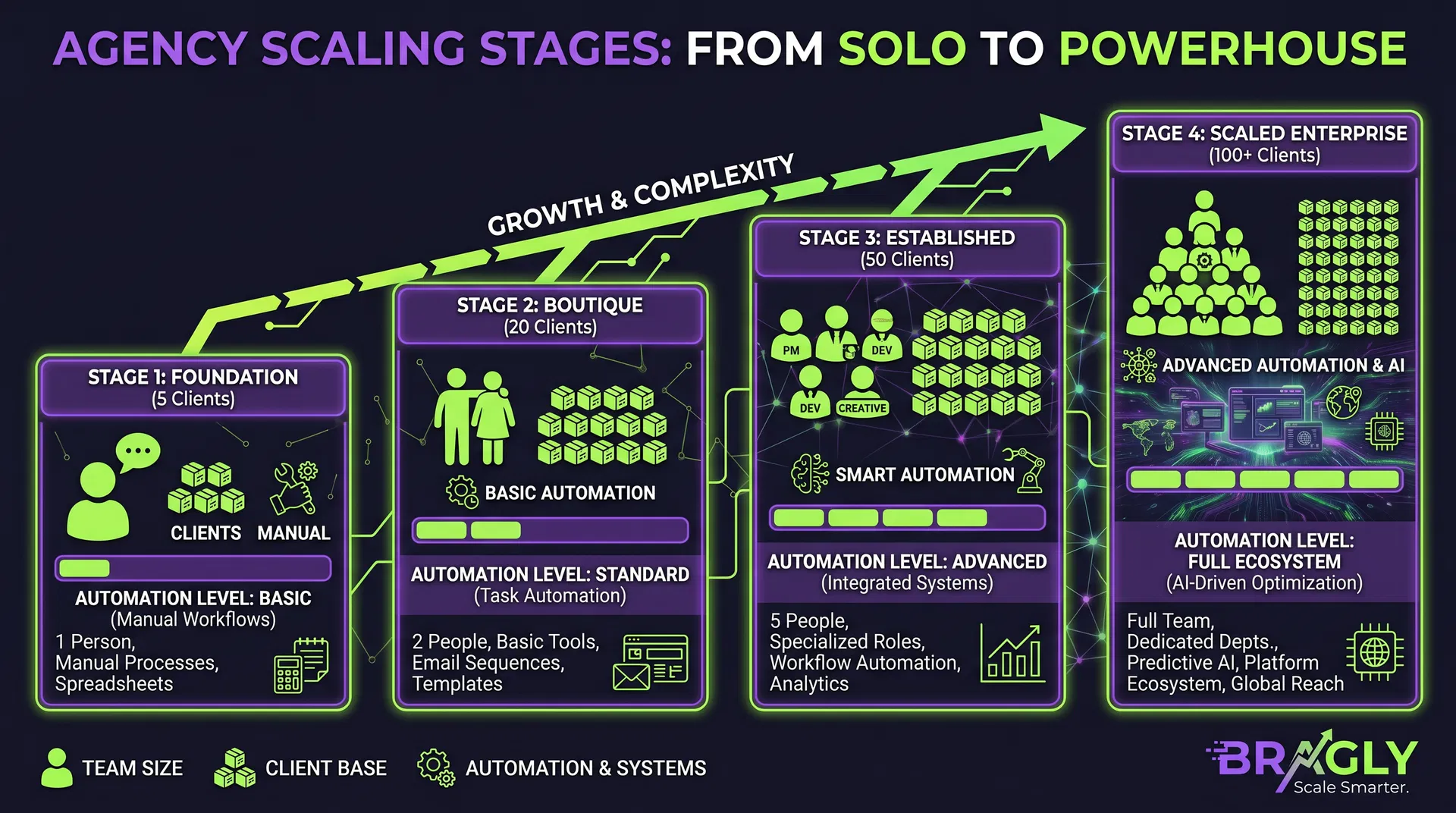
This is what agencies actually do to scale without losing their minds. It’s not rocket science, but it does require thinking about reviews differently than a solo business would.
Stage 1: The 5-Client Phase (Manual + Spreadsheet)
At 5 clients, you can still get away with mostly manual work. But start building habits now that will scale later.
Setup: Get all reviews in one place. Stop logging into 5 different platforms. Assign one person to check daily. Set a response time goal (24-48 hours). Track which clients are review magnets.
Team: One person, part-time. They spend 1-2 hours daily on reviews.
Automation: Skip it. Focus on consistency first.
Reporting: Weekly email to each client with review count and sentiment summary.
Stage 2: The 20-Client Phase (Workflow + Basic Automation)
At 20 clients, manual work breaks. You need workflow and automation.
Setup: Build response templates per client. “Thank you for the feedback” for 5-stars. “We’d love to make this right” for negatives. Set up alerts so your team knows immediately when something bad comes in. Route reviews to the right person.
Team: One full-time person + one part-time person. The full-time person manages the workflow and responds to reviews. The part-time person handles client reporting and escalations.
Automation: Auto-respond to 5-star reviews with a thank you. Flag negative reviews for manual response. Send weekly reports automatically to each client.
Reporting: Automated weekly reports per client. Monthly summary for your internal team.
Stage 3: The 50-Client Phase (Distributed Team + Smart Automation)
At 50 clients, you need a real team and smarter automation. This is where most agencies finally buy software instead of trying to DIY it.
Setup: Segment clients. High-volume clients get daily attention. Low-volume clients get weekly batches. Assign team members to specific groups. Build playbooks for different review types and industries.
Team: One team lead + 2-3 response specialists + one reporting analyst. The team lead manages workflow and quality. Response specialists handle actual replies. The analyst handles client dashboards and reporting.
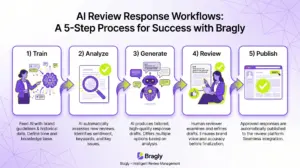
Automation: AI drafts responses. You approve before sending. Negative reviews escalate automatically. Reports go out on schedule. Alerts flag weird patterns (sudden 1-star spike, fake reviews).
Reporting: Real-time client dashboards. Automated monthly reports. Quarterly business reviews with key metrics.
Stage 4: The 100+ Client Phase (Fully Distributed + Advanced Automation)
At 100+ clients, you’re basically running a review management company inside your agency. You need advanced automation and clear permissions so people don’t accidentally nuke a client account.
Setup: Segment by industry, volume, and account health. Build industry-specific playbooks. Let clients see their own reviews without bugging you.
Team: Review management director + team leads per segment + response specialists + reporting team. Clear hierarchy and role-based access.
Automation: AI handles 60-70% of responses. Humans approve before sending. Predictive alerts catch at-risk accounts before they churn. Escalation workflows run automatically. Clients self-serve.
Reporting: Real-time dashboards for all clients. Automated reporting. Predictive analytics (which clients are at risk of churn, which are growing).
Building Your Review Management Team Structure
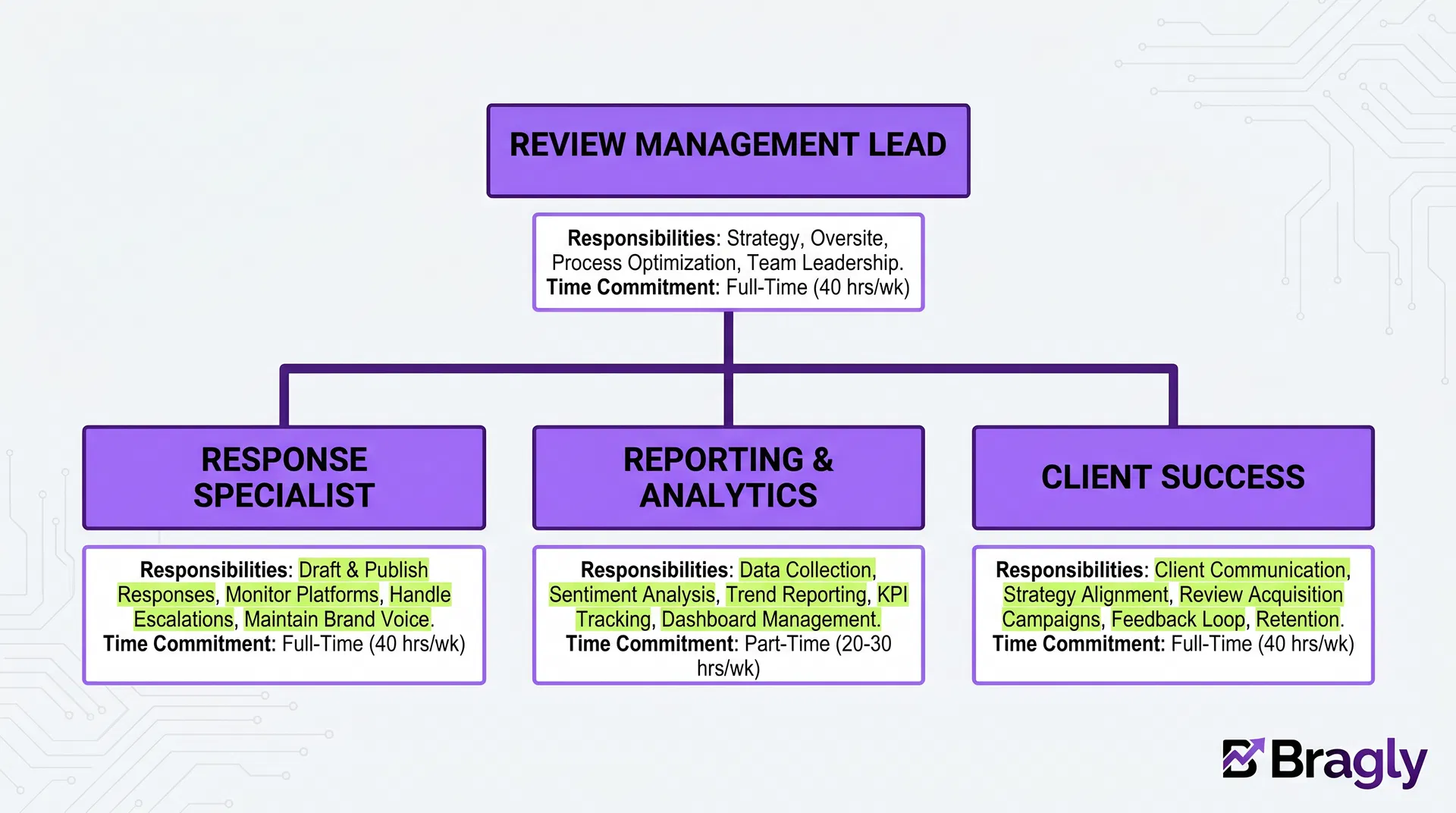
The biggest mistake: hiring people without defining roles. Everyone does everything. Nothing gets done well.
Here’s the role structure that works:
Review Management Lead
Owns strategy, quality, escalations, and team. Sets standards. Handles upset clients. Decides which clients get white-glove service vs. standard.
Time commitment: Full-time (or part of a larger marketing role at smaller agencies)
Response Specialist
Writes responses. Manages templates. Flags issues. This is the workhorse role—4-6 hours daily of actual response writing.
Time commitment: Full-time (one specialist per 15-20 clients)
Reporting & Analytics
Builds dashboards. Writes reports. Tracks metrics. Finds trends. Turns review data into insights clients actually pay attention to.
Time commitment: Part-time (one person can handle 30-50 clients)
Client Success
Onboards clients. Trains them. Fixes problems. Upsells. Makes sure clients actually use the system and get value.
Time commitment: Part-time (one person can handle 20-30 clients)
Automation Strategies for Multiple Client Accounts
Automation is the difference between scaling and burning out. But you have to do it right.

What to Automate
5-star reviews: Auto-respond with thank you. This handles 30-40% of reviews and frees your team for the actual work.
Alerts: Notify your team immediately when something negative comes in. Don’t wait for the daily check-in.
Reports: Send reports automatically. No manual work.
Response suggestions: AI-assisted responses draft replies automatically. Your team tweaks and sends. Cuts response time in half.
Escalation: Flag reviews that mention specific issues (“safety concern”, “billing error”) so they get immediate attention.
What NOT to Automate
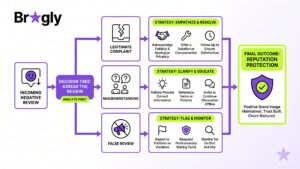
Negative reviews: Always respond manually. Customers know when they’re talking to a bot. It makes things worse.
Client communication: Don’t just send dashboards. Add a note about what changed and what you did about it.
Quality control: Always review before sending. One bad response tanks a client’s reputation.
Reporting and Client Dashboards: What to Share

Most agencies overcomplicate reporting. Clients don’t want a 50-page PDF. They want three things: Are we getting more reviews? Are they better? What are you doing about the bad ones?
The Metrics That Matter
Review volume: How many reviews this month vs. last month. Trending up or down?
Average rating: What’s the current rating? How has it changed?
Response rate: What percentage of reviews did we respond to? (Aim for 100%)
Response time: How quickly are we responding? (Aim for under 24 hours)
Sentiment: What percentage of reviews are positive, neutral, negative?
Top themes: What are customers saying? (e.g., “Great service but slow delivery”)
Dashboard vs. Report
Dashboard: Real-time view of current metrics. Clients log in anytime to see their reviews and ratings. This builds trust and reduces “how are we doing?” emails.
Report: Monthly narrative. “Here’s what happened this month, here’s what we did about it, here’s what’s trending.” This is where you show value and justify your fee.
Tools and Integrations for Scaling
You need three things: a centralized dashboard that pulls from all platforms, AI-assisted responses to save time, and review analytics clients actually understand.
Look for tools that support teams and workspaces so your team can collaborate without stepping on each other’s toes.
Multi-platform integration: Google, Yelp, Trustpilot, Facebook, Capterra, G2, Amazon, Shopify, and more. If you’re managing 50 clients across different industries, you need to aggregate all of them.
Team collaboration: Role-based permissions so your response specialist can’t accidentally delete a client account. Client ownership transfer so you can hand off accounts to clients themselves.
Client portals: Let clients see their own reviews and metrics without logging into your system. Display them with testimonial widgets on their own website.
Automation: Workflow rules, auto-responses, escalation logic, and scheduled reporting. If you’re managing 50+ clients, manual workflows will kill you.
Common Mistakes Agencies Make (And How to Avoid Them)
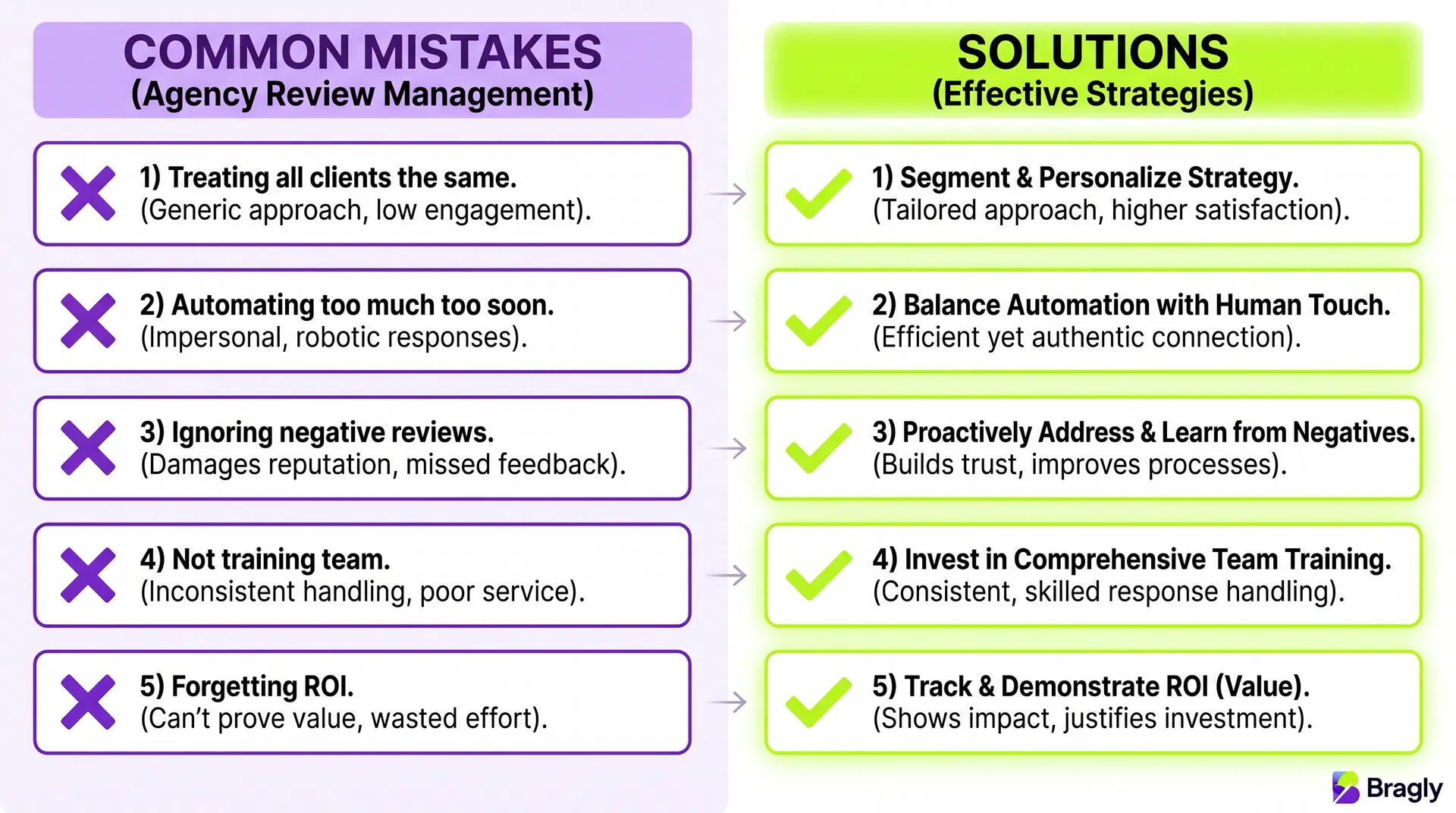
Mistake 1: Treating All Clients the Same
Not all clients need the same service level. E-commerce gets daily attention. B2B gets weekly. Segment and adjust.
Mistake 2: Automating Too Much Too Soon
Don’t auto-respond to everything. Customers know. Start with 5-stars only. Expand as you get comfortable. Quality beats speed.
Mistake 3: Ignoring Negative Reviews
A thoughtful response to a negative review can build more trust than ignoring a positive one. Prioritize negatives.
Mistake 4: Not Training Your Team
Your response specialists need to know their clients’ businesses. Generic “thank you for your feedback” doesn’t work. Train them so responses feel real.
Mistake 5: Forgetting to Show ROI
Clients don’t care about 500 responses. They care that their rating went from 4.2 to 4.6 and bookings went up 20%. Show the business impact.
Scaling Checklist: From 5 Clients to 100+
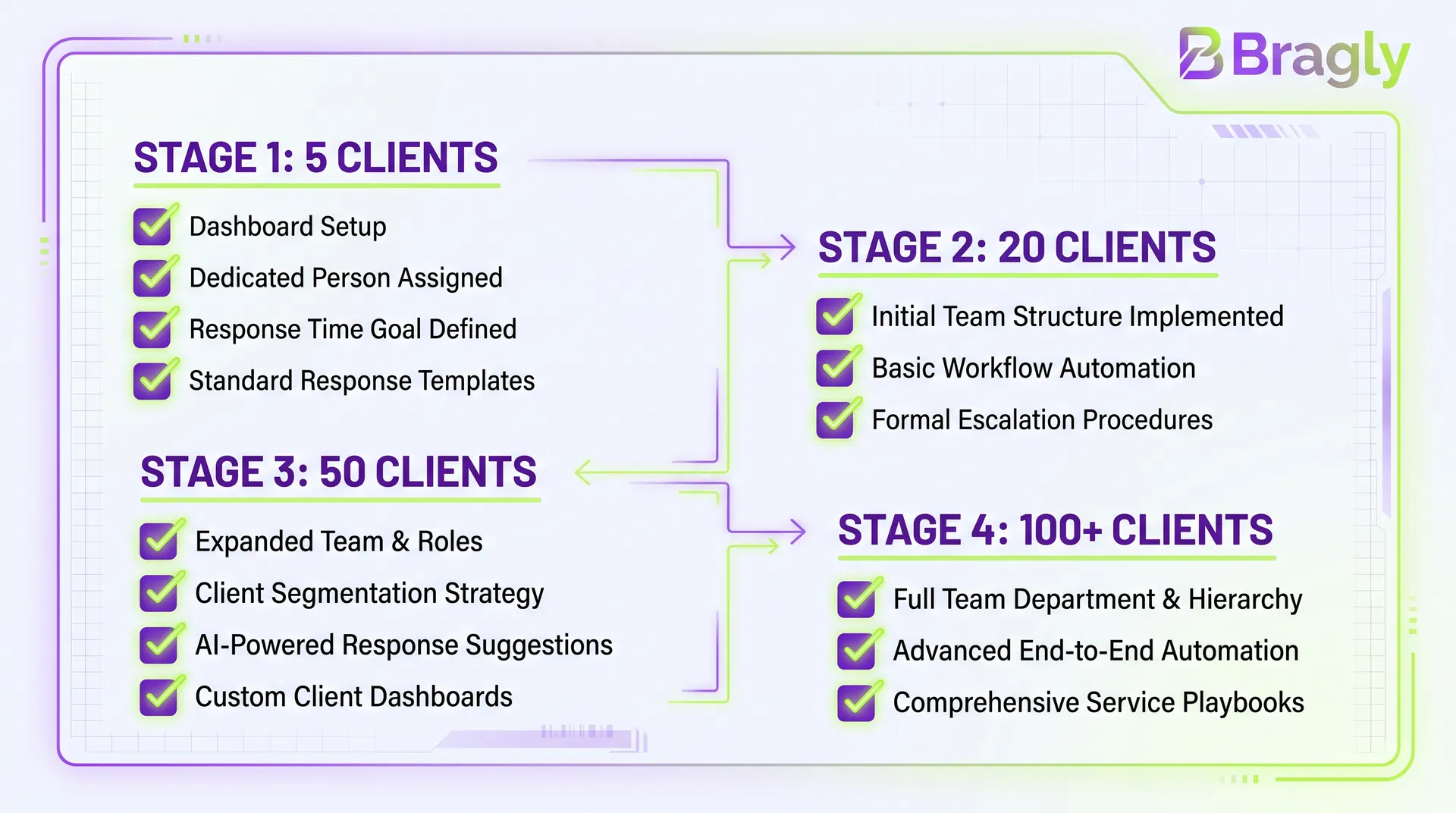
At 5 Clients
- ☐ Centralized review dashboard (all platforms in one place)
- ☐ One person assigned to reviews (consistency matters)
- ☐ Response time goal set (24-48 hours)
- ☐ Weekly client reports (email or dashboard)
- ☐ Basic response templates
At 20 Clients
- ☐ Team structure defined (lead + specialist)
- ☐ Automation rules in place (5-star auto-responses, alerts)
- ☐ Response templates per client
- ☐ Escalation workflow for negatives
- ☐ Weekly automated reports
At 50 Clients
- ☐ Team expanded (lead + 2-3 specialists + analyst)
- ☐ Client segmentation (by volume, industry, health)
- ☐ AI-assisted response suggestions
- ☐ Real-time client dashboards
- ☐ Monthly narrative reports
- ☐ Role-based permissions (no accidental deletions)
At 100+ Clients
- ☐ Full team structure (director + leads + specialists + analysts)
- ☐ Advanced automation (predictive alerts, self-serve client portals)
- ☐ Industry-specific playbooks
- ☐ Real-time dashboards for all clients
- ☐ Predictive analytics (churn risk, growth opportunities)
- ☐ Client self-serve options
The Bottom Line
Managing reviews for multiple clients doesn’t have to be chaos. You need three things: a system, a team, and smart automation.
Start with the basics at 5 clients. Build good habits. Scale to 20, 50, 100. The agencies that win aren’t the biggest. They’re the ones with the best systems.
If you’re managing multiple client accounts, look for tools that support team collaboration and client ownership transfer. This feature alone can save your team hours weekly and let you hand off accounts to clients themselves when needed.
FAQ
How many clients can one person manage?
At the early stage (mostly auto-responses), one person can handle 15-20 clients. As you add more manual work (negative reviews, escalations), that drops to 10-15. The key is automation—the more you automate, the more clients one person can handle.
Should we automate responses to negative reviews?
No. Customers can tell when they’re talking to a bot, and it makes things worse. Always respond manually to negative reviews. Automate 5-star reviews and alerts instead.
What metrics matter most for client reporting?
Three things: review volume (are we getting more?), average rating (is it going up?), and response rate (are we responding to everything?). Everything else is nice-to-have.
How do we handle clients who want daily attention vs. weekly?
Segment them. High-volume, high-value clients get daily. Low-volume clients get weekly batches. Set expectations upfront and build your workflows around it.
What’s the best way to train response specialists?
Have them shadow your best responder for a week. Then review their responses before they send. Give feedback. After 20-30 responses, they’ll get the voice. The key is consistency and knowing the client’s business.
When should we hire our first full-time review person?
At 15-20 clients. Before that, it’s part-time work. After that, you need someone dedicated or you’ll start dropping reviews.